
You Can Combine Multiple Internet Connections Together – Like Starlink, Wi-Fi, 4G, 5G, and DSL – with Speedify, to Fix Facebook Live Freezing
When Facebook videos keep freezing, or your Facebook Live broadcast stalls for the people watching, the cause is usually the internet connection rather than Facebook or your phone. Videos freeze when the download cannot keep them buffered; a broadcast stalls when your upload, the outgoing half of your internet connection, hiccups just long enough that video misses its slot.
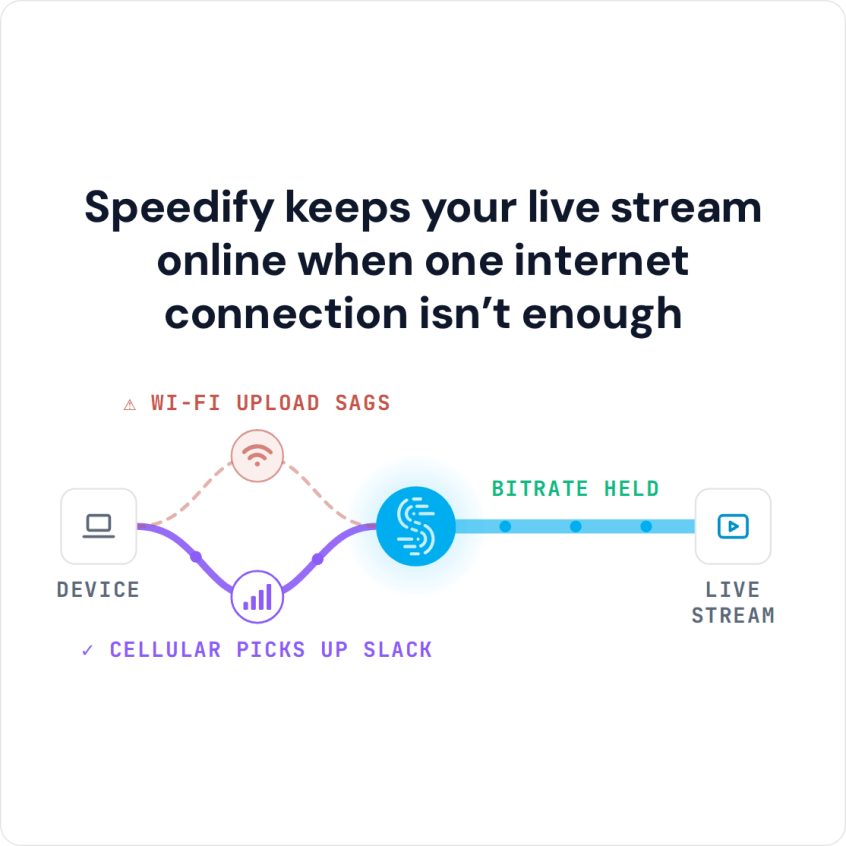
Speedify is an app that runs your internet over Wi-Fi, 4G/5G cellular, wired Ethernet, Starlink and other internet connections at the same time, so a wobble on any one of those internet connections does not stop the broadcast. With only one connection, Speedify works as an encrypted VPN and cannot stop that connection from dropping. This article explains why Facebook videos and live streams freeze, and what using Speedify gives you: videos that keep playing and a broadcast that stays smooth for your audience.
How to Keep Facebook Videos and Live Streams Playing with Speedify
- Download Speedify on the phone or computer you use for Facebook (iOS, Android, Windows or macOS).
- Open Speedify and create a free account (the free tier includes 5 GB per month), or sign in.
- Give Speedify a second internet connection: on a phone, keep Wi-Fi on and turn on 4G/5G cellular. On a computer on Wi-Fi, add Ethernet or a phone tethered over USB (on a Mac, an iPhone or a supported Android phone); on a computer on Ethernet, you can also join your phone’s Personal Hotspot over Wi-Fi.
- Connect. Speedify uses both connections at once and moves your traffic to the working one when one drops.
- Open Facebook and watch or go live as usual.
Why Facebook Videos and Live Streams Keep Freezing
Facebook videos and live streams freeze for a few reasons, and you can check most of them yourself:
- Check your app or your browser: clear app and browser cache, update them, try another browser.
- Facebook status: check whether Facebook is down on an outage tracker such as Downdetector, or ask the Facebook Help community whether it is Facebook itself or something on your end.
- Get faster, more reliable Internet: Facebook won’t work smoothly if you are connected to a weak network
As you can imagine, most often the culprit for Facebook Live freezing is your Internet connection. By default, iOS and Android mobile phones and tablets use only one Internet connection at a time. And the same goes for computers as well. Even though you may have several active connections available, your device will only use one of them: WiFi, a 4G/5G cellular connection or a wired connection. If your signal is weak or spotty for any reason, your device can lose little bits of information called packets. This results in uploads and downloads getting hung up or stopping entirely. This is why it can seem like nothing is happening, or why images don’t load and videos lag or the Facebook Live stream freezes.
Also, there may not be enough bandwidth available to watch Facebook Live streams. So, if you are tired of Facebook Live freezing, it’s time to fix this. You and your family and friends should enjoy those special moments while IN the moment as it was meant to be.
Power-Up Your Facebook Live Streams with Speedify
When Facebook Live is freezing because of your Internet, you need a faster, more reliable connection. As a VPN that combines connections, Speedify acts like a power-up for your device: instead of only using a single internet connection at a time, Speedify allows your device to use multiple connections simultaneously, for more bandwidth and a more stable stream.
Speedify constantly monitors the quality of your Internet connections. In the case of Facebook Live, that usually means Wi-Fi and cell signal strength and reliability. With 4G/5G cellular set to Secondary priority, Speedify uses Wi-Fi first and adds the cellular connection when it is needed. If the Wi-Fi becomes unreliable, Speedify will automatically reroute data until that’s back on track in terms of quality. All of this happens without you having to do anything.
Keep Your Data Secure While Streaming on Facebook Live without Freezing
There’s another important feature Speedify provides to your devices: as a VPN, Speedify gets all of your data encrypted. Speedify keeps your private information secure, protects you against a variety of cyber threats, and even keeps your ISP from spying on you. Your data and device are safe, even on public Wi-Fi networks.
Speedify was created to help you use the Internet on your terms. You get to upload, watch and comment on all of the Facebook Live videos you want, without waiting for the app to catch up.
With two internet connections working together, a weak signal on one no longer freezes your Facebook Live. Try Speedify before your next broadcast.
Facebook Live Requirements: Upload Speed and Stream Length
Facebook lets you broadcast live for up to 8 hours at a time, according to Meta’s live video specifications; after that, the broadcast ends automatically. The real question is: can your internet stay stable and fast while you live stream? Run through a Facebook Live streaming checklist before you go live to find out.
Your internet speed and stability can make or break your Facebook Live streaming career! Since everything goes through the internet, including Facebook Live streams, then issues should be expected.
When streaming, your upload speed matters. Meta’s Live Video API reference recommends 1,500 to 4,000 kbps for 720p at 30 frames per second and 3,000 to 6,000 kbps for 1080p at 30 frames per second, so at 720p a Facebook Live stream takes up to 4 Mbps of your upload speed, and 1080p takes more. Make sure your upload speed is steady, too: a stream stalls when the upload dips.
Speedify
Get started with Speedify today.
Speedify combines Wi-Fi, 4G/5G cellular, Ethernet, Starlink and satellite into one faster, more reliable internet connection. Free to try: 5 GB a month with a free account. No credit card required.
🚀 Speed
Faster uploads and downloads, because Speedify uses all your internet connections at once.
📶 Stability
If one internet connection drops, Speedify moves your traffic to the others in milliseconds.
🔒 Security
AES-256 encryption on every internet connection, on any network you join.



15M+ downloads worldwide. 75K+ five-star reviews on iOS and Android.