
You Can Combine Multiple Internet Connections Together – Like Starlink, Wi-Fi, 4G, 5G, and DSL – with Speedify, to Fix Zoom Issues
Zoom audio cutting out, or video arriving as a smear of blocks, is nearly always a bandwidth problem rather than a bug in the app. When one internet connection cannot keep up, Zoom trims quality first and disconnects you second.
Speedify is an app that uses Wi-Fi, 4G/5G cellular, Ethernet, Starlink and other internet connections at the same time, so there is capacity to spare when one of them weakens. That needs two or more internet connections; on a single connection Speedify works as an encrypted VPN and cannot stop that connection from dropping.
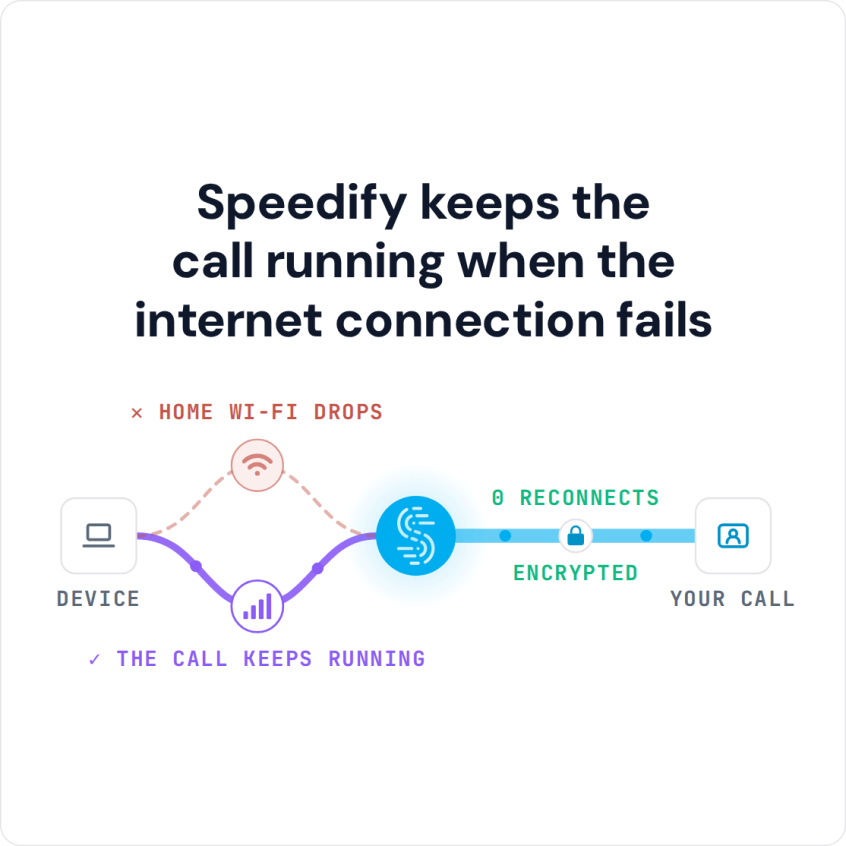
Speedify keeps the call running when the internet connection fails
Ahead you’ll read what causes Zoom audio and video faults, why chasing them setting by setting rarely holds for long, and what a call feels like with Speedify underneath it.
What Causes Zoom Audio and Video Issues
One of the main causes of Zoom issues is actually your connection to the Internet. When you have a slow, or unreliable connection, Zoom may not be able to work properly. When the app itself keeps closing, see why Zoom keeps crashing. Sometimes, you may not even realize that you have a Zoom connectivity problem until you try and use the service.
Like other video conferencing software, Zoom uses significant bandwidth, especially for video calls. Your device is sending a complex set of data packets to the device of the person you are trying to talk to, and their device is sending packets of data back to you.
The flow of these packets gets interrupted if your Wi-Fi connection has a momentary blip or your cellular connection fluctuates. It can take a few moments for the data to catch up.
This results in Zoom issues: calls where the audio cuts in and out, where the video lags, and where the audio and video don’t sync properly.
How to Check Zoom Connection Issues and Packet Loss
Zoom shows you whether the problem is your connection. During a call, open Settings > Statistics and look at the Audio and Video tabs: high latency, jitter or packet loss there points at your internet connection, not at Zoom. Before an important call, join a test meeting at zoom.us/test to check your camera, microphone and speaker.
If Zoom says your internet connection is unstable, move closer to the router or plug in Ethernet, and pause large uploads such as cloud backups. If the problem comes back whenever the connection dips, a second internet connection is the fix that holds.
How Speedify Fixes Zoom Connection Issues
Speedify fixes the Zoom issues that come from your internet connection, as long as you have two or more connections to combine. The Speedify app monitors the quality of your internet connections in the background. On a mobile device, Speedify can combine your Wi-Fi and cellular connection simultaneously in a single “pipe”. Or combine any number of connections on a computer.
This improves your bandwidth and leads to a smoother Zoom conference meeting.
Speedify also reroutes data when something happens to one of your connections. When you stumble upon a bad Wi-Fi hotspot, or your connection suddenly goes out, you stay connected: Speedify intelligently and automatically reroutes your data through the other available connection(s) until both networks are back.
Speedify is available for iOS, Android, macOS, Windows and Linux.
Stable and Encrypted Zoom Calls with Speedify
Speedify does more than just manage your internet connections. Speedify is also a VPN that combines connections: Speedify encrypts all of the data you send and receive from your device, which helps keep your private information and conversations secure from digital eavesdroppers and cyber thieves.
Speedify doesn’t just reduce your Zoom connection problems: the rest of what you do online during the call runs over the same combined connection.
Most VPNs slow down your Internet connection a little, and on a single connection Speedify can too. With two or more connections, Speedify adds encryption while combining their speed.
Forget about checking the Zoom outage map. Address Zoom issues related to your internet connection with Speedify.
Speedify
Get started with Speedify today.
Speedify combines Wi-Fi, 4G/5G cellular, Ethernet, Starlink and satellite into one faster, more reliable internet connection. Free to try: 5 GB a month with a free account. No credit card required.
🚀 Speed
Faster uploads and downloads, because Speedify uses all your internet connections at once.
📶 Stability
If one internet connection drops, Speedify moves your traffic to the others in milliseconds.
🔒 Security
AES-256 encryption on every internet connection, on any network you join.



15M+ downloads worldwide. 75K+ five-star reviews on iOS and Android.