
My Internet is Down, Comcast
The Comcast light is on but nothing loads, and before you spend an hour on the phone it is worth knowing whether the fault is your own modem or an outage across your neighborhood, because the two need different responses.
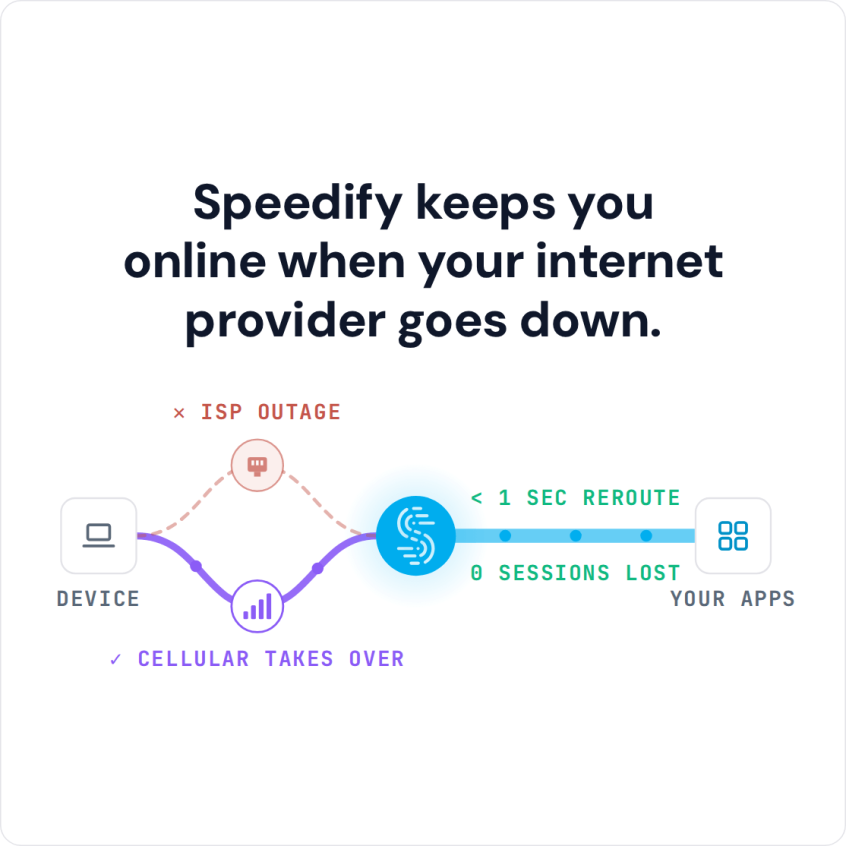
Speedify is an app that carries your internet over Wi-Fi, 4G/5G cellular, Ethernet, Starlink and satellite internet connections together. Speedify cannot repair a Comcast outage, but it keeps you working through one by moving your traffic onto your phone’s 4G/5G cellular. Speedify can only keep you online through a drop when it has two or more internet connections to work with, for example Wi-Fi plus your phone’s 4G/5G cellular. On a single connection, Speedify works as an encrypted VPN and cannot stop that connection from dropping. Read on for how to check for a Comcast outage, what to try on your modem, and how using Speedify keeps you online while Comcast is down.
Speedify keeps you online when your internet provider goes down.
How to Check for a Comcast Outage in your Area
Before you contact the support and say, “my internet is down, Comcast,” you can check if it’s actually an outage:
- Visit the Comcast Xfinity Status Center.
- Sign in to see if there’s an outage in your local area.
You can sign in using your phone number or your Xfinity username and password.
To create a Comcast username and password, you’ll need to enter your mobile phone number or your social security number. You will receive a message on your phone number (if you entered the SSN, you’ll get the message on the number registered on the SSN account).
Enter the code on the website and you’ll be able to create an Xfinity username and password. So the next time you sign in, you won’t need your phone for the code. Just enter the username and password to access the services available on Comcast website.
How to Solve the “My internet is down Comcast” Problem
If there’s an outage in your area, unfortunately, all you can do is sit and wait. Maybe use your phone’s 4G/5G cellular. Sure, cellular data can be expensive, but there’s not much else you can do.
But if there’s no outage in your area and your router / modem is working fine too, the issue might be with sticky WiFi hotspots.
This happens when you’re on the move. When you change your positions, your device leaves the signal that’s weak and connects with a stronger signal. If that’s the issue you’re having, Speedify can keep you online by using your 4G/5G cellular alongside Wi-Fi while your device switches networks.
Even if you’re not on the go but are just sitting in an area with weak signals, Speedify can combine Wi-Fi and 4G/5G cellular for more speed and reliability.
Speedify: Stay Online When Comcast Internet Is Down
In a city, you are usually surrounded by Wi-Fi hotspots. You might have access to at least two Wi-Fi networks but you can’t use both of them simultaneously. At the same time, your phone’s 4G/5G cellular connection is available and waiting.
When using the Internet, you have to choose one of the connections, and this limits your speeds. Speedify helps you combine two or more connections so you can get faster, more reliable internet. And apart from increasing your speeds, it also encrypts your traffic. This way, your internet activities remain private to you.
Your ISP cannot see which sites you visit, and a hacker on the same network cannot monitor your connection either. Speedify can also help you access the websites that are blocked for you on a network you use, such as a YouTube video or other sites blocked by your office or school. Check your school’s or employer’s rules first.
Speedify, an app that combines internet connections and works like a VPN, does all of that, and it runs on your iPhone, Android, Windows PC or Mac. Get the Speedify app, keep your phone’s 4G/5G cellular on as a second internet connection, and stay online the next time Comcast goes down.
Speedify
Get started with Speedify today.
Speedify combines Wi-Fi, 4G/5G cellular, Ethernet, Starlink and satellite into one faster, more reliable internet connection. Free to try: 5 GB a month with a free account. No credit card required.
🚀 Speed
Faster uploads and downloads, because Speedify uses all your internet connections at once.
📶 Stability
If one internet connection drops, Speedify moves your traffic to the others in milliseconds.
🔒 Security
AES-256 encryption on every internet connection, on any network you join.



15M+ downloads worldwide. 75K+ five-star reviews on iOS and Android.