
You Can Combine Multiple Internet Connections Together – Like Starlink, Wi-Fi, 4G, 5G, and DSL – with Speedify, to Fix Slow Instagram
Instagram is so slow for one of three reasons: Instagram itself is having problems, the app is out of date or your phone is short of storage, or your internet connection is weak or crowded. The connection is the usual cause when Instagram slows to a crawl in the same places every time: a busy street, a full train, the back of the house where the Wi-Fi barely reaches. Your phone uses one internet connection at a time, and in those spots that one connection is not enough.
Speedify is an app that lets your phone use Wi-Fi and 4G/5G cellular at the same time, so the two cover for each other and the feed keeps moving. Speedify needs both connections to help: on a single connection it works as an encrypted VPN, does not make that connection faster and can be a little slower.
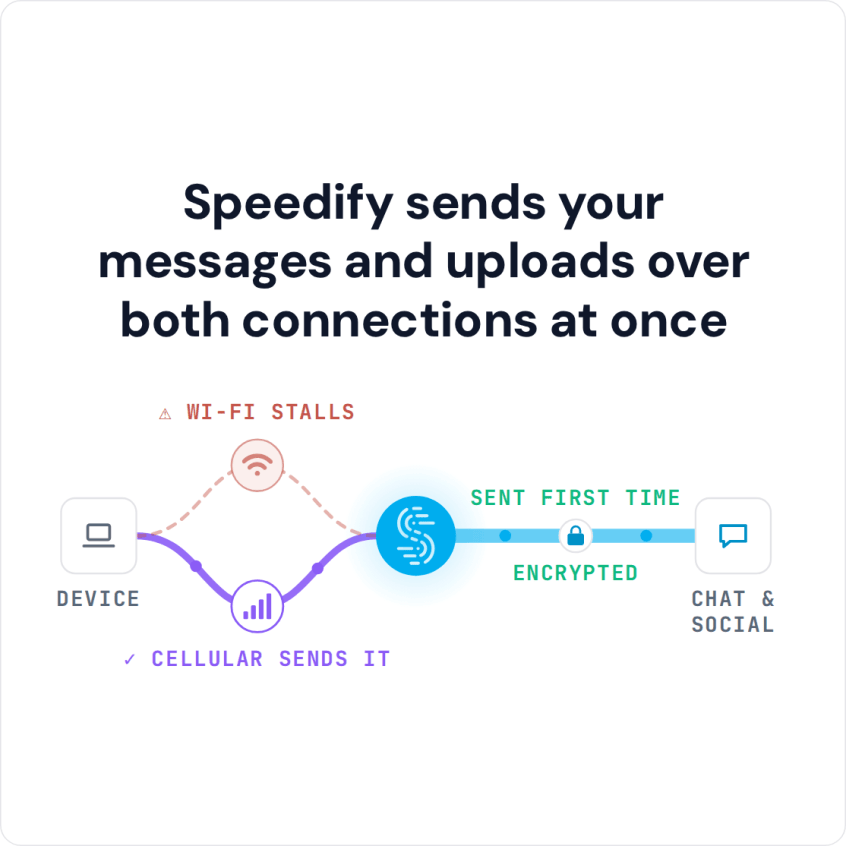
Speedify sends your messages and uploads over both connections at once
This post covers what actually causes the slowdown, how running both internet connections together helps, and what to do when Instagram is blocked rather than just slow.
How to Fix Slow Instagram with Speedify
- Download Speedify on your phone (iOS or Android); Speedify also runs on Windows and macOS.
- Open Speedify and create a free account (the free tier includes 5 GB per month), or sign in.
- Keep Wi-Fi on and turn on cellular data, so Speedify has a second internet connection.
- Connect. Speedify sends traffic over both connections at once and moves it to the working one when one weakens.
- Open Instagram and use it as usual.
Why Instagram Is Slow to Load: Weak Signal and Crowded Networks
By default, iPhones, Android phones and tablets use only one Internet connection at a time: Wi-Fi or 4G/5G cellular. If your signal is weak or spotty for any reason, your device can lose little bits of information. Uploads and downloads then hang or stop entirely: images don’t load, and videos lag or keep buffering.
There may not be enough bandwidth available to complete your request as quickly as you would like. It’s a little like being caught in a traffic jam on the freeway.
Before blaming the connection, check whether other people report Instagram problems on Downdetector, update the Instagram app, and free up storage on your phone (on Android, clearing the app’s cache also helps). If Instagram is still slow to load after that, the connection is the problem.
Speedify Combines Wi-Fi and 4G/5G Cellular to Fix Slow Instagram
With Speedify, which you can download for iPhone, Android, Mac and PC, your phone can use 4G/5G cellular and Wi-Fi simultaneously instead of one connection at a time, so photos, Stories and Reels keep loading when one connection weakens.
How Speedify Keeps Instagram Loading When Wi-Fi Fails
Speedify does more than add a second Internet connection. Speedify checks the quality of your Wi-Fi and cellular signal all the time. If Wi-Fi goes bad, Speedify moves the traffic to cellular until your Wi-Fi works again.
You can also control how much cellular data Speedify uses. With connection priorities, set cellular to Secondary or Backup, and Speedify leans on the Wi-Fi and uses cellular only when the Wi-Fi is not enough or drops.
Instagram Blocked at School or Work: How Speedify’s Encryption Helps
Besides combining connections (see how combining differs from load balancing), Speedify encrypts your traffic like a VPN. Encryption keeps your private information secure, protects you against cyber threats on open networks and keeps your ISP from spying on you. Speedify keeps no activity logs of the sites you visit, though it does record connection details such as your IP address and data used.
On a restricted Wi-Fi network, such as at school or the office, Instagram is blocked by the network itself. Speedify sends your traffic through an encrypted connection to a Speedify server, so the local network sees only that connection, not the apps you open. Speedify does not get past every block, and the network’s rules still apply.
Speedify Encrypts Instagram Traffic on Public Wi-Fi
Your Instagram traffic stays encrypted on every connection Speedify uses, even on public Wi-Fi networks, so other people on a café or airport network cannot read what you post.
If Instagram is still slow, give it a second internet connection with Speedify. Get started now for FREE: a free Speedify account includes 5 GB per month.
Speedify
Get started with Speedify today.
Speedify combines Wi-Fi, 4G/5G cellular, Ethernet, Starlink and satellite into one faster, more reliable internet connection. Free to try: 5 GB a month with a free account. No credit card required.
🚀 Speed
Faster uploads and downloads, because Speedify uses all your internet connections at once.
📶 Stability
If one internet connection drops, Speedify moves your traffic to the others in milliseconds.
🔒 Security
AES-256 encryption on every internet connection, on any network you join.



15M+ downloads worldwide. 75K+ five-star reviews on iOS and Android.