
Troubleshooting Wi-Fi Hotspot Connections
A hotspot not working, at a cafe, an airport or from your own phone, usually comes down to congestion or a hotspot with no internet behind it. A wireless network has a fixed amount of capacity, and once dozens of people are streaming and downloading over it, your device is genuinely connected but barely getting data through.
Speedify is an app that splits your internet traffic across the Wi-Fi hotspot and your own 4G/5G cellular at the same time. That needs both connections: on the hotspot alone, Speedify works as an encrypted VPN and cannot fix the hotspot. Coming up are the common hotspot faults, the fixes for a public or a personal hotspot that will not work, and why Speedify makes a crowded hotspot usable again.
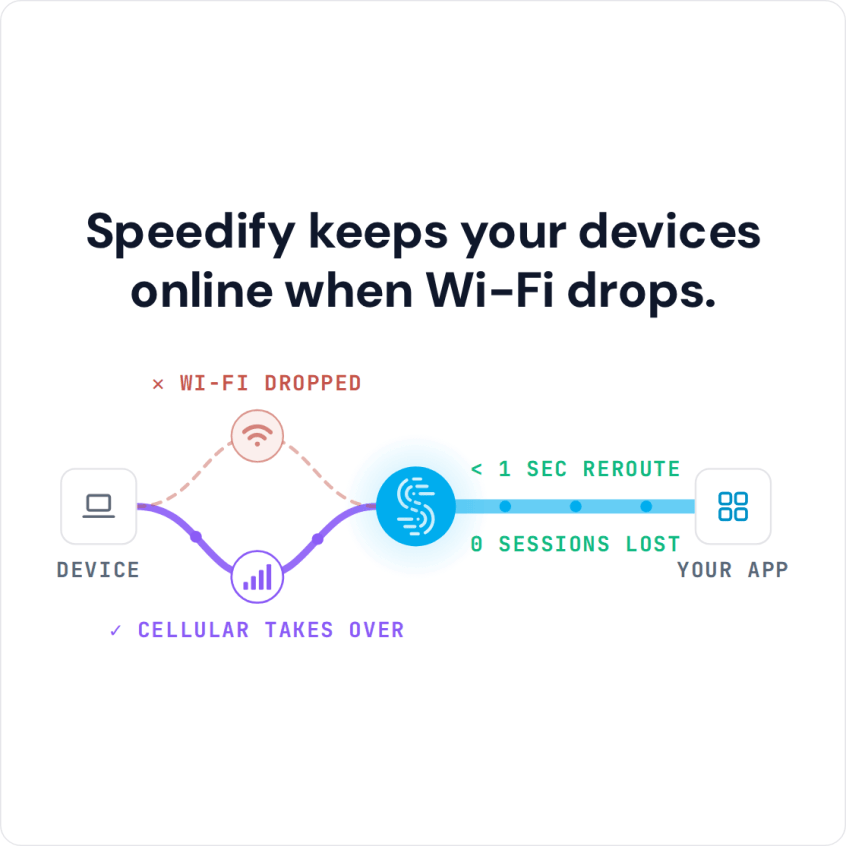
Speedify keeps your devices online when Wi-Fi drops.
How to Stay Online When a Hotspot Is Not Working with Speedify
- Download Speedify on your phone or computer (Windows, macOS, iOS, Android).
- Open Speedify and create a free account (the free tier includes 5 GB per month), or sign in.
- Give it a second internet connection: on a phone, keep Wi-Fi on and turn on cellular data; on a computer, add Ethernet or a phone connected by USB.
- Connect. Speedify uses both connections at once and moves your traffic to the working one when one drops.
- Keep browsing as usual; when the hotspot stops passing data, Speedify carries on over the other connection.
Why Your Hotspot Is Not Working: The Common Causes
The most common hotspot problem is no internet: you can connect to the hotspot, but you cannot get online. The hotspot itself may be offline, its own internet connection may be down, or the network may need you to sign in on a web page first.
Sometimes the hotspot will not let you connect at all: it has reached its limit of connected devices, the password was typed wrong, or the router has a fault.
Network congestion is another frequent cause. With too many users connected, you get slow browsing, connection dropouts and a connection that comes and goes. Every network has a limit on how much traffic it can carry, and a busy hotspot hits it.
Interference is the quieter cause. Wi-Fi shares a small set of wireless channels with every network and device nearby, so in a busy building a hotspot on a crowded channel struggles even when few people use it.
Another common cause of faulty Wi-Fi hotspot connections is the lack of maintenance. The owners of the hotspot might not be tech savvy and not even notice when their hotspot is not working. If it’s a coffee shop or a similar place where you can be in contact with the management, you might ask them to at least restart the router. That alone could fix it.
A personal hotspot on a phone has causes of its own. Your cellular plan may not include hotspot (tethering) data, or you may have used up its hotspot allowance, so check the plan with your carrier. Android phones can turn the hotspot off when no device has been connected for a while (a timeout you can switch off in the hotspot settings), and battery saver can turn it off too. On an iPhone, open Settings > Personal Hotspot, turn on Allow Others to Join and keep that screen open while the other device connects.
How to Fix a Public or Personal Hotspot That Isn’t Working
Restarting the router (or the phone running the hotspot) is the first fix to try, at home or on your own personal hotspot. Sometimes that is not enough: the hotspot’s internet connection itself may be down, and you cannot fix that on your own.
If a laptop won’t connect to a hotspot, forget the network on the laptop and join it again, typing the password carefully. On a phone hotspot, check how many devices it already serves, and on an iPhone turn on Maximize Compatibility in Settings > Personal Hotspot, which moves the hotspot to the 2.4 GHz band that older laptops need. Updating the laptop’s Wi-Fi driver and restarting both devices clears most of what is left.
If interference is the problem, move your router to the least used channel: a Wi-Fi analyzer app shows which channels the networks around you use. A phone hotspot rarely lets you pick a channel, but switching its band between 2.4 GHz and 5 GHz has a similar effect.
One way to get online is to switch to your 4G/5G cellular. But then you do not know when the Wi-Fi is back, so you keep spending cellular data you could have saved.
Speedify combines a Wi-Fi hotspot connection and your 4G/5G cellular instead. Speedify knows when a connection is down and shifts traffic to the other connection until it works again.
Speedify is an app for combining internet connections that also encrypts your traffic like a VPN, for more reliable, faster and more secure connectivity when you have two or more connections.
How Speedify Keeps You Online When a Hotspot Stops Working
Speedify protects you from disconnects when a hotspot you connect to stops working, and adds security on networks you do not control. By combining internet connections, Speedify can use all available internet connections simultaneously: on your phone, that is Wi-Fi and 4G/5G cellular; on your computer, any number and type of connections. When one drops, Speedify keeps the same public IP address, so calls and logged-in sessions carry on.
Speedify protects you from compromised Wi-Fi networks and keeps your data safe from the prying eyes of hackers, ISPs and even the hosts of the network.
Stay safe using Speedify on public Wi-Fi networks for work or fun, without putting your data at risk, and try it with the free tier: 5 GB per month with a free account.
Speedify
Get started with Speedify today.
Speedify combines Wi-Fi, 4G/5G cellular, Ethernet, Starlink and satellite into one faster, more reliable internet connection. Free to try: 5 GB a month with a free account. No credit card required.
🚀 Speed
Faster uploads and downloads, because Speedify uses all your internet connections at once.
📶 Stability
If one internet connection drops, Speedify moves your traffic to the others in milliseconds.
🔒 Security
AES-256 encryption on every internet connection, on any network you join.



15M+ downloads worldwide. 75K+ five-star reviews on iOS and Android.