
Speedify Keeps You Online Whether Starlink Is Down for You or for Everyone
To find out if Starlink is down, open the Starlink app. It shows whether your Starlink dish is online and, if it isn’t, the reason, including when Starlink itself reports an outage. If an outage tracker like Downdetector shows a sudden jump in reports at the same moment, Starlink is down for many people in your area, not just you.
Starlink does go down. Short drops happen all the time, because your Starlink dish switches satellites about every 15 seconds, and now and then there’s a wider outage. Below: every way to check Starlink’s status, how to tell your own problem from a Starlink outage, and how Speedify keeps you online either way by using Starlink together with 4G/5G cellular, Wi-Fi, wired Ethernet or a satellite internet service other than Starlink. With Starlink as your only internet connection, Speedify works as an encrypted VPN and cannot keep you online when Starlink goes down.
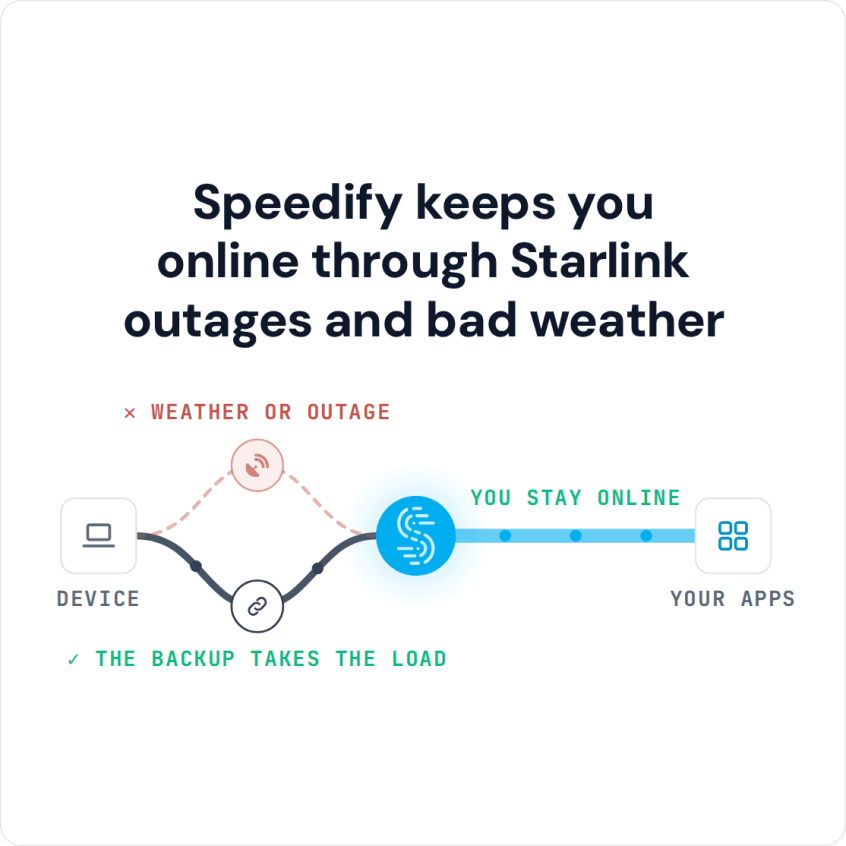
Speedify keeps you online through Starlink outages and bad weather
Starlink Internet Connection Dropouts Happen to Everyone
Speedify measures thousands of Starlink users in more than 150 countries. From 29 September to 12 October 2026, fixed Starlink dishes went offline for about 37 minutes a day on average, and Starlink dishes on RVs and boats for about 61 minutes a day.
Starlink also switches each dish to a new satellite every 15 seconds, and a switch can cause a short dropout. Even a perfectly installed Starlink dish goes offline, and about 7 in 10 Starlink users on Speedify use Starlink together with a second internet connection, like 4G/5G cellular.
How to Check if Starlink Is Down
- The Starlink app. The Starlink app shows whether your Starlink dish is online and names the reason if it isn’t, for example obstructed, no signal received, or a service outage.
- dishy.starlink.com or 192.168.100.1. Open either one in a browser while you’re on Starlink Wi-Fi to see the status, uptime and recent outages of your Starlink dish.
- The Speedify app. If you use Speedify with Starlink, the Speedify Starlink Control Center shows live status, speed, ping, uptime and alerts for each Starlink dish.
- The Starlink Help Center. Starlink explains what each status and alert means, and how to fix it, at the Starlink Help Center.
- Outage trackers. A sudden jump in reports on a site like Downdetector means a wider outage, not a problem with your Starlink dish alone. Starlink’s official website is starlink.com: a status page on another address, like starlink-internet.com, isn’t Starlink’s own, so treat it as one more outage tracker and confirm in the Starlink app.
For what each status and alert in the Starlink app means, see how to check your Starlink status.
How to Tell a Starlink Dish Problem from an Area-Wide Starlink Outage
The Starlink app is the fastest way to tell. If it shows your Starlink dish obstructed or with no signal received, and no service outage, the problem is on your side: your Starlink dish’s view of the sky, a cable, or the Starlink router. If the Starlink app reports a service outage, or outage trackers fill up with reports at the same moment, Starlink is down across the area and there’s nothing on your end to fix.
That decides your next step. A problem on your side means troubleshooting. A Starlink outage means waiting, or using another internet connection. The Speedify Starlink Index gives a sense of the odds: in 31 days of data, no day looked like a Starlink-wide outage, and most Starlink downtime came from individual Starlink dishes. See what 31 days of Speedify Starlink Index data show about Starlink outages.
How Often Starlink Goes Down: Satellite Switches and Longer Outages
There are two kinds of Starlink downtime. The first is short drops: your Starlink dish switches from one satellite to the next about every 15 seconds, and each switch can cause a drop too short to notice on a web page but long enough to freeze a video call. See why Starlink drops every 15 seconds.
The second is outages that last minutes or longer, caused by something blocking your Starlink dish, bad weather, a software update, or, less often, a problem across the Starlink network. To see how often your own Starlink dish goes down, check its uptime in the Starlink app or in the Speedify Starlink Control Center. Across the Speedify Starlink Index, from 29 September to 12 October 2026, Starlink dishes were online 96.77% of the time, about 46 minutes a day offline. For how that is measured, read how Speedify measures Starlink reliability.
What to Do Once You Know Why Starlink Is Down
If the problem is your Starlink dish, start with the basics: restart it, check for obstructions in the Starlink app, and check the cable. If your Starlink dish is online but your devices have no internet, see how to fix Starlink with no internet connection. If Starlink is down across your area, you can only wait or switch to another internet connection. See what to do when Starlink is down.
Stay Online While Starlink Is Down, with Speedify
Checking whether Starlink is down is easier when you aren’t losing a call while you do it. Speedify is an app that uses Starlink together with 4G/5G cellular, Wi-Fi or a wired line at the same time. When Starlink drops, Speedify moves your traffic to your other internet connections, so your calls and streams keep running while you check the status at your own pace. A second Starlink dish doesn’t help in a Starlink-wide outage, because both dishes go down together. Speedify needs that second internet connection: if Starlink is your only internet connection, Speedify can’t keep you online during an outage.
To watch your Starlink dish’s status all the time, see how to monitor Starlink outages and uptime with Speedify, or see how Speedify combines internet connections.
Speedify
Get started with Speedify today.
Speedify combines Wi-Fi, 4G/5G cellular, Ethernet, Starlink and satellite into one faster, more reliable internet connection. Free to try: 5 GB a month with a free account. No credit card required.
🚀 Speed
Faster uploads and downloads, because Speedify uses all your internet connections at once.
📶 Stability
If one internet connection drops, Speedify moves your traffic to the others in milliseconds.
🔒 Security
AES-256 encryption on every internet connection, on any network you join.



15M+ downloads worldwide. 75K+ five-star reviews on iOS and Android.