
Unbreakable VPN Connection for Your Phone by Combining Starlink, Wi-Fi, 4G, 5G, and DSL with Speedify
A VPN on a cell phone is an app that encrypts everything your phone sends and receives and routes it through the VPN provider’s server, so the Wi-Fi network or cellular carrier you are on cannot read it. That matters because everything sensitive you own passes through your phone, from banking apps to email and work logins, usually over whatever Wi-Fi happens to be nearby.
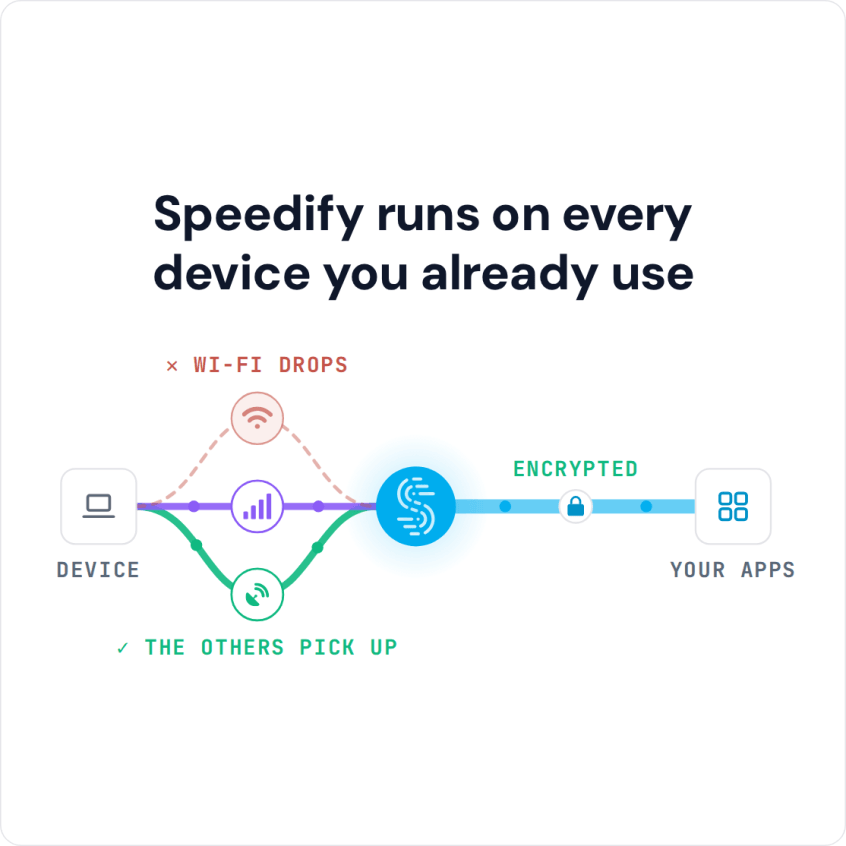
Speedify is an app that combines Wi-Fi, 4G/5G cellular, Ethernet, Starlink and satellite internet connections into one faster, more reliable connection, and encrypts your traffic like a VPN. On iPhone and Android phones, Speedify keeps Wi-Fi and 4G/5G cellular active at once, so calls and uploads survive the moment one internet connection drops. Those gains need both connections on; on a single connection, Speedify works as an encrypted VPN and can be a little slower.
This post covers what a VPN on your phone protects (your private data on public Wi-Fi, and work files when you are on the road), its pros and cons, and what Speedify adds that most VPN apps miss: more speed for live video, and phone calls that do not cut out.
How to Set Up a VPN on Your Phone with Speedify
- Download Speedify from the App Store on an iPhone (iOS 17 or later) or from Google Play on an Android phone (Android 9 or later).
- Open Speedify and create a free account (the free tier includes 5 GB per month), or sign in.
- Tap Allow when your phone asks to add a VPN configuration.
- Keep Wi-Fi and 4G/5G cellular both turned on. Speedify connects to a Speedify server automatically and uses both connections at once.
- Use your apps as usual. Speedify stays connected while your phone is in standby.
A VPN Helps You Reach Your Home Services from Abroad
Some services and content, on YouTube and elsewhere, are limited to certain countries, so when you try to access your service from abroad, it may not work the same way.
Pros: A VPN lets you connect to a server in your home country, which may make some location-restricted sites from home accessible while you travel; some services block VPN servers, so try another server. Streaming libraries are different: Speedify does not unblock geo-restricted streaming libraries, and you see the library of the country you are in.
Cons: Some networks block VPN connections, some content providers refuse connections from known VPN servers, and some banking apps flag them too. In Speedify, the Bypass setting (or App Bypass on Android) sends a chosen service or app outside the encrypted tunnel.
A VPN Protects Work Files on Your Phone When You Work Remotely
Sometimes it’s much easier to reply to someone via email from your iPhone or Android smartphone. But if you need to attach a confidential document (presentation, worksheet, etc.), you typically have to get it from the company’s online drive, which needs a secure connection.
Pros: With a VPN on your phone, your traffic is encrypted on any Wi-Fi network, so the connection to your company’s files is not exposed on the network you happen to be on.
Cons: Your company may require its own VPN app to reach internal files. Speedify is not a corporate VPN: it does not connect you to a company intranet, and two VPN apps can’t reliably run side by side on the same phone, so check with your IT team.
Combining Wi-Fi and 4G/5G Cellular Delivers More Bandwidth for Live Video and Calls
Pros: Some VPN services let you use multiple Internet connections at once, so you get more bandwidth. That can mean less buffering for video streaming, fewer dropped business calls, and a live broadcast on Facebook, YouTube or Twitch at higher quality.
Cons: Most VPN apps cannot do this, combining needs two internet connections, and it spends 4G/5G cellular data, so set a data cap on the cellular connection if your plan is limited. Single-connection VPNs still keep you protected, but you compromise on speed and reliability.
What the VPN Setting on Your Phone Means and How to Turn a VPN Off
The VPN entry in your phone’s settings lists the VPN configurations that apps such as Speedify added when you tapped Allow, and shows whether one is connected. To turn a VPN off, disconnect it in the app that added it, or turn it off from that VPN entry; your phone then sends traffic over Wi-Fi or 4G/5G cellular without the VPN’s encryption. If you see a VPN there that you do not recognize, check which app added it.
Bottom Line: A VPN on Your Phone, and Where Speedify Fits
Speedify is a fast VPN that combines multiple Internet connections on your iPhone or Android smartphone, with advanced encryption (AES-256-GCM or ChaCha20-Poly1305). Speedify keeps no record of the sites you visit; it does record connection metadata such as your IP address, device ID, connection times and data used.
Get started with Speedify today for free: a free account includes 5 GB per month, and the app runs on iOS 17 or later and Android 9 or later.
Speedify
Get started with Speedify today.
Speedify combines Wi-Fi, 4G/5G cellular, Ethernet, Starlink and satellite into one faster, more reliable internet connection. Free to try: 5 GB a month with a free account. No credit card required.
🚀 Speed
Faster uploads and downloads, because Speedify uses all your internet connections at once.
📶 Stability
If one internet connection drops, Speedify moves your traffic to the others in milliseconds.
🔒 Security
AES-256 encryption on every internet connection, on any network you join.



15M+ downloads worldwide. 75K+ five-star reviews on iOS and Android.