
Enjoy the Fastest Public WiFi Anytime. Forget About WiFi Maps and Ranks
Speedify gives you faster, more reliable public Wi-Fi by using it together with your phone’s 4G/5G cellular connection instead of relying on one shaky hotspot. Speedify is an app that combines two or more internet connections at once into one faster connection, so streaming and calls stop buffering and dropping.
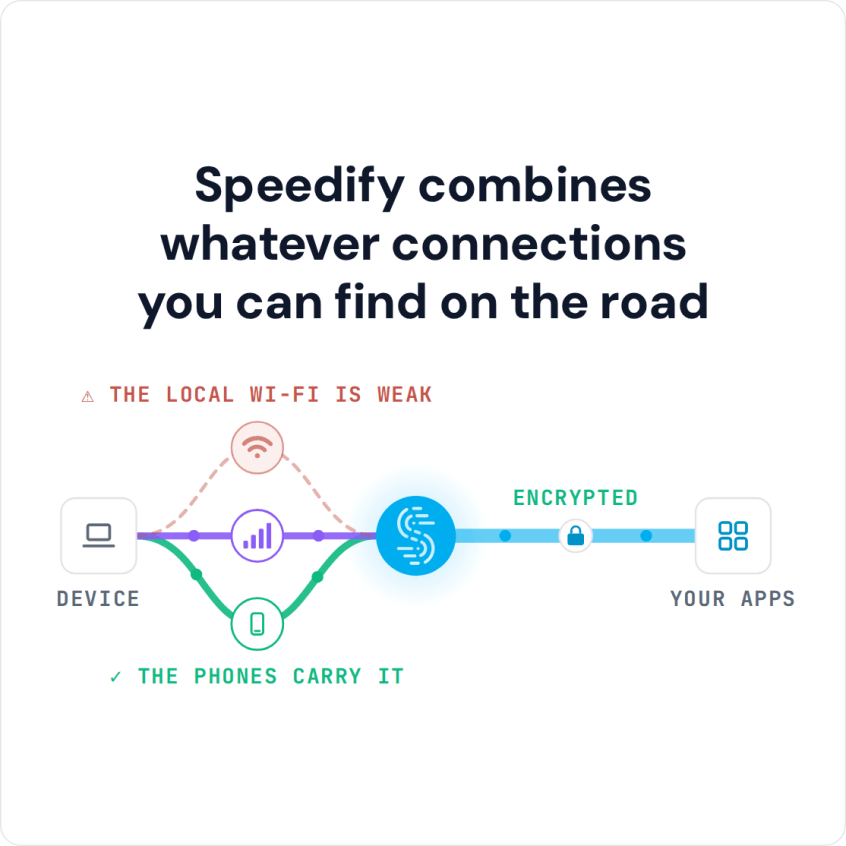
If a public hotspot slows or fails, your traffic keeps moving over 4G/5G cellular, so you stay online.
Speedify combines whatever connections you can find on the road
How do I use WiFi and 4G/5G cellular at the same time with Speedify?

Pick your two internet connections and your device below and we'll take you to the step-by-step setup guide.


Free Public Wi-Fi Hotspots from Internet Providers Are Often Slow
If you are an Xfinity, Time Warner Cable (now Spectrum), Optimum or other internet provider customer, you can usually use your provider’s local or national network of free public Wi-Fi hotspots. Some of these hotspots are slow, and on some the login page never loads, so you cannot get online unless you open it manually.
You can best see that when walking down the street, streaming something from Apple Music or Twitch and suddenly it begins to buffer or even disconnects. Guess what: your phone just connected automatically to a bad WiFi hotspot.
If you keep running into public WiFi hotspots that are anything but fast, you’re not the only one, and there’s a simple way to deal with them: use the hotspot and your 4G/5G cellular connection at the same time.
Why Some Public Wi-Fi Hotspots Connect but Do Not Work
First and most often, some public WiFi hotspots sit where the signal is spotty or drops into dead zones. These are “zombie” hotspots: your phone shows it’s connected to the public WiFi network, but no website loads.
Second, by default, as you’re moving around, you will be “passed” around from hotspot to hotspot, like in the case of a cellular network. If you’re connected to the public WiFi, your iPhone or Android smartphone will “navigate” from one WiFi hotspot to another (Xfinitywifi, TWCWiFi, CableWiFi, OptimumWiFi, Starbucks, McDonalds, Macy’s etc.). Smartphones are bad at detecting poor WiFi networks, and they default to WiFi instead of 4G/5G cellular when it’s available. Connecting to a bad WiFi hotspot is often the same as having no Internet at all, the complete opposite of the fastest public WiFi.
Because of these problems, most people either tell their phones to “Forget” certain WiFi networks or turn off WiFi to get off the broken hotspot. But then the phone won’t join working WiFi hotspots either, and it uses up cellular data.
How to Boost a Public Wi-Fi Signal and Get More Bandwidth on Shared Wi-Fi
A weak public Wi-Fi signal gets better when you sit closer to the access point, with fewer walls in between. More bandwidth on a shared connection is harder to get, because everyone on the hotspot splits the same capacity. The dependable fix is a second internet connection, such as your phone’s 4G/5G cellular, used at the same time as the Wi-Fi, which is what Speedify does.

3 Steps to Make Public Wi-Fi Faster with Speedify
Using its own technology for combining connections, Speedify securely combines 2 or more Internet connections, adding up their speed and keeping you online if one fails.
Here is how to set it up:
- Download Speedify on your computer or phone and sign in, or create a free account, which includes 5 GB per month (Linux needs a paid plan). Speedify runs on Windows, macOS, Android, iOS and Linux.
- Leave all your Internet connections active. On iPhones and Android smartphones, turn on both WiFi and 4G/5G cellular. You can set data caps from within the Speedify app, so you won’t go over your plan and pay extra. On computers you can use any number and type of connections: wired Ethernet, 4G/5G cellular, WiFi and more.
- Open Speedify and connect. Speedify automatically detects every active Internet connection, uses them together, and adds new ones as they appear.
How Speedify Helps You Get the Fastest Public WiFi
By using multiple Internet connections at the same time with Speedify, your iPhone, iPad, Android smartphone or laptop gets the combined bandwidth of all its connections. You also avoid the disconnects that happen when you get handed off from one public WiFi hotspot to another. And if your device joins a hotspot with no working Internet, Speedify uses the other connection and will keep you connected to the Internet.
Speedify Encrypts Your Traffic on Public Wi-Fi
Speedify also works as a mobile VPN. When you use Speedify on public WiFi, you also get data encryption, even on networks with captive portals: you don’t need to disconnect from Speedify to log onto the network. Speedify protects you against fake routers, snooping ISPs, and other cyber threats without giving up speed. Encryption also keeps your browsing hidden from your internet provider, a concern since the repeal of the net neutrality rules.
While other VPNs can be clunky and slow, Speedify is easy to use and improves the speed and quality of your Internet connection while encrypting it.
If you use public WiFi hotspots regularly, get started with Speedify today with a free account (5 GB per month) and use every local or nationwide hotspot together with your 4G/5G cellular connection.
Speedify
Get started with Speedify today.
Speedify combines Wi-Fi, 4G/5G cellular, Ethernet, Starlink and satellite into one faster, more reliable internet connection. Free to try: 5 GB a month with a free account. No credit card required.
🚀 Speed
Faster uploads and downloads, because Speedify uses all your internet connections at once.
📶 Stability
If one internet connection drops, Speedify moves your traffic to the others in milliseconds.
🔒 Security
AES-256 encryption on every internet connection, on any network you join.



15M+ downloads worldwide. 75K+ five-star reviews on iOS and Android.