
Fortnite Connection Issues? Check If There Are Problems or Outages
Freezing at the worst possible moment in Fortnite is sometimes an Epic Games outage, but far more often your own internet connection dropped data for a second. Fortnite is fast and bandwidth-hungry, so a shaky Wi-Fi signal or a household streaming in the next room is enough to get you eliminated.
Speedify is an app that carries your game traffic across Wi-Fi and 4G/5G cellular together, and can draw on Ethernet, Starlink and satellite internet connections too. Speedify can only keep you online through a drop when it has two or more internet connections to work with, for example Wi-Fi plus your phone’s 4G/5G cellular. On a single connection, Speedify works as an encrypted VPN and cannot stop that connection from dropping. Two troubleshooting tips come first below: checking Epic’s status page, then your own internet connection. After that comes what using Speedify changes.
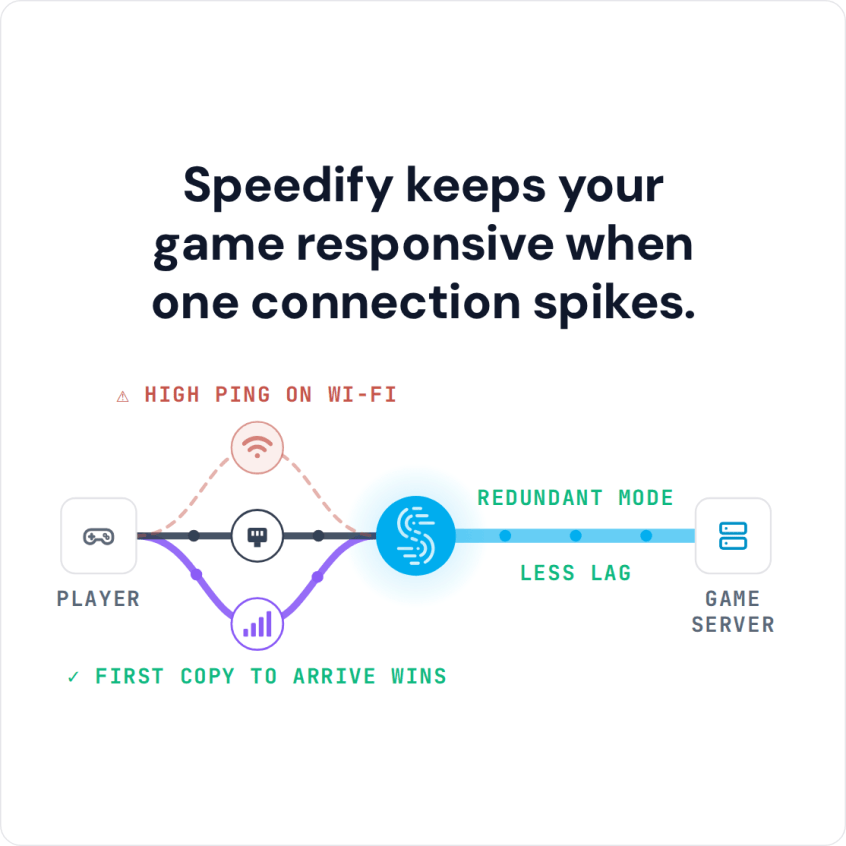
Speedify keeps your game responsive when one connection spikes.
Fortnite Gameplay Issues with Slow Unstable Network Connections
The quality and speed of your Internet connection is critical to enjoying Fortnite. If your Internet connection is unstable or slow, you are going to get killed fast. The battles are fast-paced. If you lose connectivity for even a second, you will miss out on getting the best gear.
If you are playing with a squad of your friends, they aren’t going to be happy if you freeze up instead of providing backup in the heat of the battle.
Because Fortnite is such a fast game with so many players, it uses up a lot of bandwidth. If you are playing on your mobile device or are relying on an erratic Wi-Fi connection, you are going to be toast.
Fortnite Connection Issues Tip #1: Check Out Operational Status from Epic Games
If you find yourself in the situation of having connection issues when playing Fortnite, do this first. Check out Epic Games’ public status website to see if Fortnite’s services are operational or experiencing degraded performance.
Should you see any issues, then contact them directly to find out when things will be fixed. Epic Games is also very active on Twitter, so you can get timely updates there.
Everything OK with the Epic Games servers and services? Then the Fortnite connection issues are on your part. If slow updates are the problem, see how to make Fortnite downloads faster.
Fortnite Connection Issues Tip #2: Troubleshoot Your Internet Connection
This tip assumes everything is good with the Mac, PC, smartphone or gaming console you’re playing Fortnite on. Check out this step-by-step network connectivity troubleshooter from Epic Games.
Most of the steps there involve checking settings on your router or modem. They are not hard with minimal networking knowledge, and they are worth doing before anything else.
Why Does Fortnite Ban VPNs?
Epic Games has set up certain IP bans to protect its servers from spammers and brute force attacks. Because VPNs can be used to avoid IP bans, Epic Games forbids players from using them. Unfortunately, this means that honest users looking for a Fortnite latency and packet loss fix are out of luck.
What Happens if You Try to Use a VPN with Fortnite?
Many Reddit users proudly proclaim that they have been able to use a VPN while playing Fortnite, but for every success story, there is another user, or ten, who ended up with a locked account.
Fortnite includes a number of built-in anti-cheating mechanisms. A common in-game message reads, “You were removed from the match due to internet lag, your IP or machine, VPN usage, or for cheating. We recommend not utilizing VPN or proxy services while attempting to play Fortnite.” Therefore, gamers are reluctant to risk using a VPN, even if a solution like Speedify could fix their connectivity issues.
How Speedify Helps with Fortnite Connection Issues
Speedify runs on iOS, Android, Mac and Windows devices. Speedify is an app that combines internet connections and encrypts them like a VPN, so Epic’s rules on VPNs apply: check them before you play. Playing Fortnite from your gaming console? Consoles do not run Speedify, but you can share the Speedify connection via Wi-Fi from a computer, or use a router running Speedify, and connect your PlayStation, Xbox or Nintendo.
Speedify monitors the quality of your Internet connection and can combine two or more different internet connections together at once. With two connections you get faster, more stable internet, and when one drops, Speedify moves the game to the other. On just one Internet connection, Speedify still recovers lost packets, but it cannot stop that connection from dropping and it cannot shorten the route to Epic’s servers; with two connections in Redundant Mode, your ping follows whichever connection is faster at that moment.
Some Fortnite players fixed their packet loss with Speedify: check out this Reddit thread.
Two Connections Are Better Than One to Solve Fortnite Connection Issues
As explained above, Speedify uses its technology for combining internet connections to run multiple Internet connections at once. If you want, you can set 4G/5G cellular or other metered connections to the Backup priority, so Speedify uses them only when your main connection fails. If something goes wrong with one of your connections, Speedify moves everything to the working connection in milliseconds and keeps the same public IP address, and when the lost connection comes back, Speedify uses it again.
Speedify handles the switching for you: download the app, add a second internet connection and play.
Speedify
Get started with Speedify today.
Speedify combines Wi-Fi, 4G/5G cellular, Ethernet, Starlink and satellite into one faster, more reliable internet connection. Free to try: 5 GB a month with a free account. No credit card required.
🚀 Speed
Faster uploads and downloads, because Speedify uses all your internet connections at once.
📶 Stability
If one internet connection drops, Speedify moves your traffic to the others in milliseconds.
🔒 Security
AES-256 encryption on every internet connection, on any network you join.



15M+ downloads worldwide. 75K+ five-star reviews on iOS and Android.