
Continuously Monitor Your Internet Connection and Avoid Disconnects
Moving around the house or the city breaks an internet connection more often than anything else does. Phones and laptops are built to use one network at a time, so they cling to a fading Wi-Fi signal instead of switching to cellular data, and there is a gap every time they do change.
Speedify is an app that runs your internet over Wi-Fi, 4G/5G cellular, Ethernet, Starlink and satellite internet connections at once, closing those gaps. Speedify can only keep you online through a drop when it has two or more internet connections to work with, for example Wi-Fi plus your phone’s 4G/5G cellular. On a single connection, Speedify works as an encrypted VPN and cannot stop that connection from dropping. Ahead is why phones and laptops keep connecting and disconnecting, and what using Speedify gives you: an internet connection that holds as you move, with your data kept private.
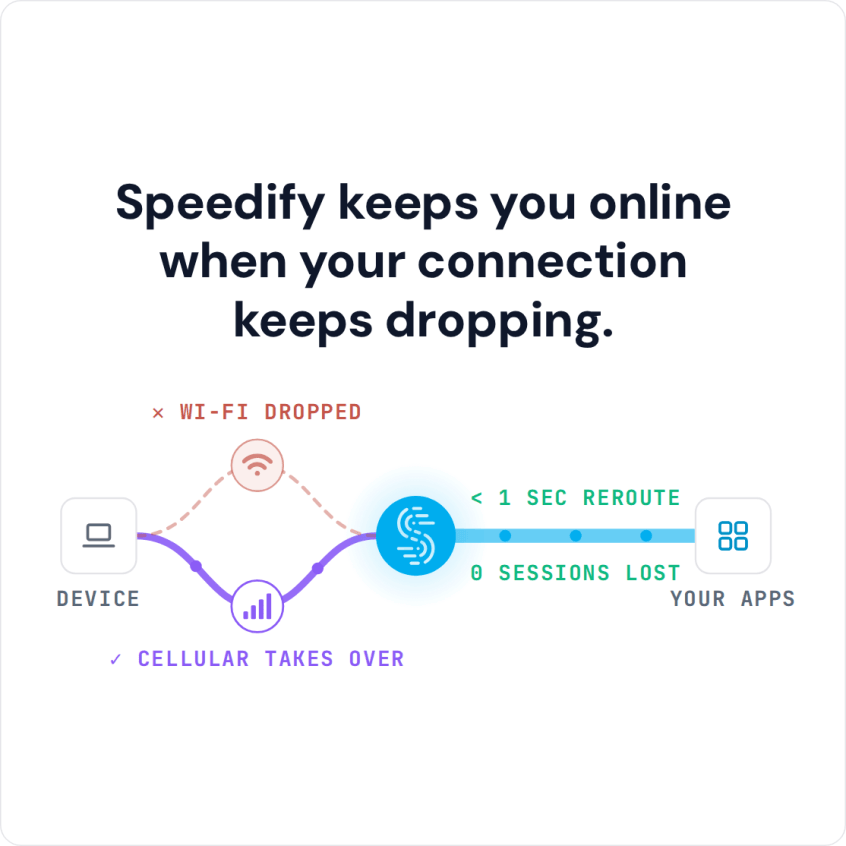
Speedify keeps you online when your connection keeps dropping.
Why Is the Internet Continuously Connecting and Disconnecting?
The issue is your smartphone, tablet or laptop is not designed for continuous connectivity. By default, it sends all Internet traffic over one active connection:
- for smartphones and tablets: the cell network or WiFi connection.
- for laptops: the WiFi connection or wired Ethernet connection or any USB network adapters you may have.
If you are relying on your mobile network signal and you lose coverage, you lose your Internet connection. If you are on a WiFi network and then you move to a new location or the WiFi encounters issues, your connection is gone.
Speedify Gets You a Continuous Internet Connection
Speedify lets your smartphone, tablet or laptop connect to all active connections at the same time, so one of them dropping does not cut you off.
If something happens with one connection, your web traffic is automatically routed through the other connection, without you having to do anything. If your Wi-Fi connection fails, for example when you move out of range or join a bad Wi-Fi hotspot, Speedify moves your traffic to your other connection, such as 4G/5G cellular or wired Ethernet, and keeps the same public IP address, so calls and logged-in apps carry on.
The Speedify app works in the background to manage your connections, and it doesn’t drain your battery either.
Always Connected, Fast Internet Wherever You Go
With two or more connections, Speedify also adds their speeds together, which helps in dead zones and on painfully slow public Wi-Fi. Speedify can also prioritize your traffic: if you want, Speedify uses Wi-Fi whenever possible and saves your cellular data for when you need it.
Walk around the city, hop on a train or take an Uber, and Speedify keeps your traffic moving as networks come and go. Watch your favorite show or live stream your downtown adventures without dealing with lag or losing your connection every time one network fades.
More Than a Continuous Internet Connection: Speedify Also Protects Your Data and Privacy
Sometimes public WiFi hotspots can make you vulnerable to cyberattacks. When you use the Speedify app on your mobile device it will also encrypt your web traffic with advanced technology that doesn’t slow down your phone, but keeps you safe and your data private. It keeps your data safe from the prying eyes of ISPs and hackers. And it doesn’t keep any browsing logs either!
Speedify is available for all major platforms: Windows, macOS, Android and iOS. If you aren’t using Speedify, you are missing out on the joy of a true continuous Internet connection. Get Speedify today and enjoy the Internet on your own terms.
Speedify
Get started with Speedify today.
Speedify combines Wi-Fi, 4G/5G cellular, Ethernet, Starlink and satellite into one faster, more reliable internet connection. Free to try: 5 GB a month with a free account. No credit card required.
🚀 Speed
Faster uploads and downloads, because Speedify uses all your internet connections at once.
📶 Stability
If one internet connection drops, Speedify moves your traffic to the others in milliseconds.
🔒 Security
AES-256 encryption on every internet connection, on any network you join.



15M+ downloads worldwide. 75K+ five-star reviews on iOS and Android.