


Speedify Improves IRL Live Streaming Videos with Stable Internet
Speedify combines Wi-Fi, 4G / 5G cellular, Ethernet, Starlink and other satellite internet connections together for faster upload and download speeds. Whether at home, work, or on-the-go, Speedify works with all live streaming software and social platforms to get you a more reliable and secure internet connection.
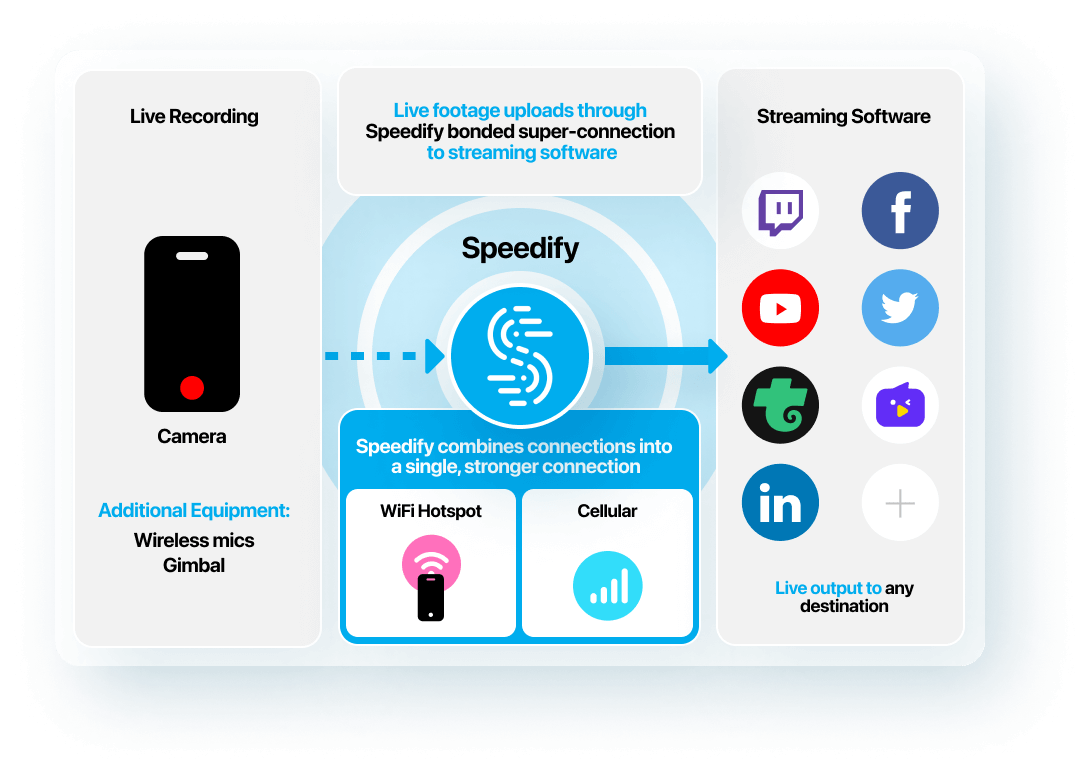
Speedify Internet Connection Bonding Software - Essential to Any IRL Live Video Streaming Setup
Speedify connection bonding software uses Wi-Fi, 4G / 5G cellular, Ethernet, Starlink and other satellites for the best performance of your IRL live stream, no matter where you are or what device you're on.
When live streaming IRL, you'll find yourself in situations where you'll experience unreliable Internet at some point:
- When traveling / on the go – on the street, bus, train. You may be connected to a bad / spotty WiFi hotspot.
- In crowded areas – the available bandwidth for both Wi-Fi and cellular data connections may not be sufficient to serve everyone on a stadium, at a concert or at a frat house party.
- At home – if your ISP is doing maintenance work right when you’re broadcasting live streams. Or if they’re throttling your connection.
Speedify is a must have tool in your IRL live streaming video tech stack. It’s a powerful Internet connection bonding software app that gets you faster, more reliable and secure Internet. Speedify dynamically optimizes IRL live streams based on your connectivity. Speedify runs on computers, smartphones, tablets and various devices that run Linux, including Raspberry Pi.
Depending on the device, you can combine any mix of two or more Wi-Fi networks, cellular networks and wired networks. By doing that, you’re not only solving the reliability aspect of live streaming through the automatic Internet failover mechanism, but also the bandwidth and latency issues.
IRL Live Streaming Video Setup Checklist
Streaming Device
Video Camera
Speedify Connection Bonding Software
External Battery Pack
Streaming Apps
Cellular Data Connections
Speedify engineers love talking tech on YouTube, Tiktok, and Instagram!
Alex Gizis and the Speedify engineers discuss and explain technology including Starlink satellites, Wi-Fi 7 routers, Apple networking features, fiber optics, broadband internet, 5G mobile networks, AI, networking protocols, and much more. Follow Speedify on YouTube, TikTok, Instagram, and LinkedIn!