
You Can Join Multiple Internet Connections Together – Like Starlink, Wi-Fi, 4G, 5G, and DSL – with Speedify, to Solve Discord Connection Issues
Discord voice cutting out while you are calling plays to your squad usually traces back to your internet connection, not to Discord. Voice needs a steady trickle of data, so even a one-second gap where nothing arrives mutes you or drops you from the voice channel.
Speedify is an app that sends your traffic over Wi-Fi, 4G/5G cellular, Ethernet, Starlink and satellite internet connections at the same time, and it encrypts that traffic as it goes. Speedify can only keep you online through a drop when it has two or more internet connections to work with, for example Wi-Fi plus your phone’s 4G/5G cellular. On a single connection, Speedify works as an encrypted VPN and cannot stop that connection from dropping. Start with the basic Discord checks in this article, then see how running Speedify keeps your voice chat clear for a whole gaming session. If the app itself locks up, here is how to fix Discord freezing.
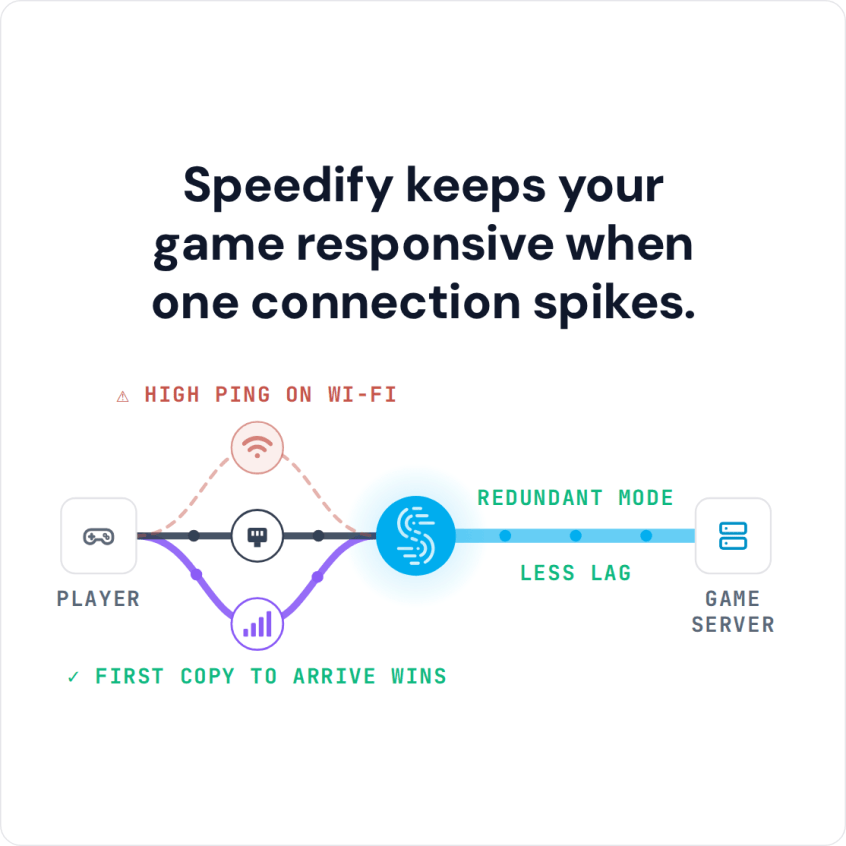
Speedify keeps your game responsive when one connection spikes.
How to Fix Connection Issues on Discord
Discord can sometimes generate problems while connecting. The most common issue is related to voice connections.
If you’re unable to get a steady voice connection with Discord, here are a few steps you can take.
- Restart your device and router.
- Check your firewall and make sure you white list Discord.
- Update the Discord app.
- Discord may be restricted on networks at schools, colleges and on company networks. Check in with your network admin.
If you are getting stuck on the main screen, here are some further steps to take.
- Check your device date and time
- Scan your computer for malware
If your Discord still has issues, it might be because of slow internet. To make sure this doesn’t happen, use a faster internet connection.
However, faster connections might not always be available. You cannot increase your speeds beyond what your subscription and router is offering. But you CAN combine multiple connections.
If you use a regular VPN, you might see speed drops because of the added encryption and rerouting of traffic done by VPNs. With an app that combines internet connections, such as Speedify, you stay secure and, with two or more connections, add their speeds together. On a single connection, Speedify works as an encrypted VPN and can be a little slower.
How to Use Multiple Internet Sources to Fix Discord Connection Issues
Assuming you already have an account set up with Discord, here’s what you have to do to fix Discord connection issues:
Step 1: Get the Speedify app, open it and connect. To keep Discord online when one connection drops, give Speedify a second internet connection, such as 4G/5G cellular from your phone.
Step 2: Choose a VPN server close to a Discord voice server. A nearby server keeps the route short.
Step 3: Run Discord in the browser or via the app. Now you can create a Discord server, join existing servers, etc.
Using Discord with a VPN is pretty much like using it without a VPN. Just make sure you switch on the VPN before you use it.
Speedify, the Faster Solution for Your Discord Connection Issues
If your Discord connection issues are due to slow Internet speeds, you can use Speedify to get a safer and faster connection.
Speedify works by combining multiple connections. This way, you will get a stable Internet connection that can also be faster. You can combine your Wi-Fi connection with your phone’s 4G/5G cellular. Or you can combine multiple Wi-Fi connections.
On just one connection, Speedify still detects lost packets and resends them before Discord or your online game notices the packet loss.
And of course, it also works as a VPN, which means it secures your connection and hides your IP.
Get Speedify, give it a second internet connection, and keep Discord voice running when one connection drops.
Speedify
Get started with Speedify today.
Speedify combines Wi-Fi, 4G/5G cellular, Ethernet, Starlink and satellite into one faster, more reliable internet connection. Free to try: 5 GB a month with a free account. No credit card required.
🚀 Speed
Faster uploads and downloads, because Speedify uses all your internet connections at once.
📶 Stability
If one internet connection drops, Speedify moves your traffic to the others in milliseconds.
🔒 Security
AES-256 encryption on every internet connection, on any network you join.



15M+ downloads worldwide. 75K+ five-star reviews on iOS and Android.