
Unbreakable VPN Connection for Windows by Combining Starlink, Wi-Fi, 4G, 5G, and DSL with Speedify
Can a VPN protect a Windows PC without making it slower? Yes, once the VPN stops depending on one internet connection.
Speedify for PC is a VPN app for Windows that encrypts everything leaving your PC, then uses your internet connections together (home Wi-Fi, wired Ethernet, a phone shared over USB, Starlink), so uploads and downloads get more speed than one internet connection alone provides. Your traffic on public Wi-Fi stays encrypted, and an internet connection that drops does not end what you were doing.
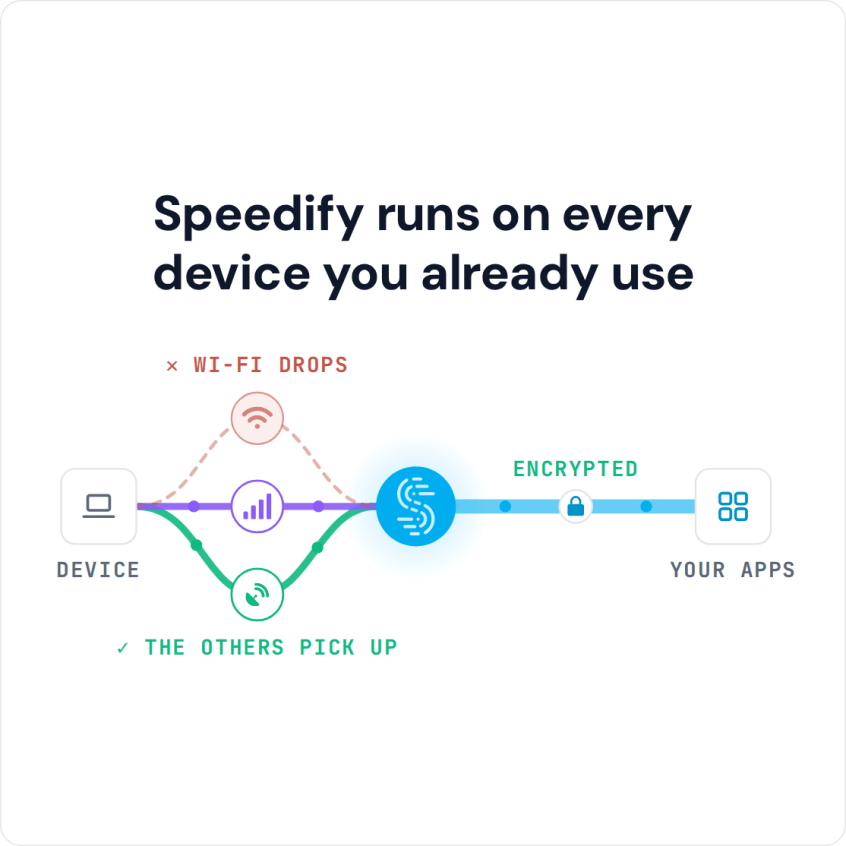
Speedify runs on every device you already use
Below: how to install Speedify on your Windows PC, which Windows versions it runs on and what it costs, what a VPN actually does, and why most VPN services for Windows cost you speed. Speedify’s speed and failover gains need two or more internet connections, such as Wi-Fi plus a phone’s 4G/5G cellular; on a single connection, Speedify works as an encrypted VPN and can be a little slower. If you have never used a VPN, start with how to get your first VPN.
How to Set Up Speedify for PC on Windows
- Download Speedify for Windows (Windows 10 or later) and run the installer.
- Open Speedify and create a free account (the free tier includes 5 GB per month), or sign in.
- Connect a second internet connection if you have one: plug in an Ethernet cable, tether your phone over USB (an iPhone needs Apple’s drivers, which come with iTunes or Apple Devices), or add a USB Wi-Fi adapter.
- Turn Speedify on. Speedify connects to a Speedify server automatically and uses every connected internet connection at once.
Speedify for PC: Windows Versions and Price
Speedify for PC needs Windows 10 or later and runs on both x86_64 and arm64 PCs, so Windows 7 and Windows 8 are not supported. A free account includes 5 GB per month; a paid Individual plan costs $89.99 a year ($7.49 a month billed yearly), as little as $4.99 a month on a 3-year plan, or $14.99 month to month, and covers up to 5 devices at once.
What a VPN Is and How It Works on a Windows PC
VPN stands for Virtual Private Network: a secure, encrypted channel between your Windows PC and a VPN server. When you are using a VPN service, all of the data that is sent to and from your Windows computer is encrypted, and others are not able to read it. Here is how to set up Speedify on Windows for privacy.
Using a VPN for Windows protects you even on a compromised Wi-Fi network and keeps anyone else from snooping on your Internet activity. Your ISP and the IT department running the network at your job or school cannot see which websites you visit or what you send and receive, which also helps you avoid data throttling.
Connection Speed and Stability: the Most Frequent Issues with VPN for Windows Services
The biggest problem with any “classic” VPN for Windows is that it slows down your Internet connection. The only difference between different traditional VPN services is how much they will slow you down.
Sometimes a VPN makes it almost impossible to stream a movie or have a smooth conversation over Skype.
Traditional VPNs send all your encrypted traffic over one internet connection to one server, so the extra trip and the encryption overhead come out of that one connection’s speed.
Cases of a VPN dropping connection are frequent too, and worse, some VPNs do not reconnect after the Internet comes back, leaving you unprotected.
Speedify for PC: A VPN for Windows That Combines Internet Connections
Speedify works differently from traditional VPN services for Windows: it is a VPN that combines connections. Speedify will encrypt your data, then its technology for combining internet connections sends the data in pieces over all your connections at once and reassembles it on Speedify’s servers.
With two or more internet connections, you no longer have to choose between security, speed and stability: movies keep streaming and video conference calls keep going when one connection drops, and when you play online video games, Speedify keeps the game connected (and in Redundant Mode, your ping follows whichever connection is faster at that moment).
Speedify can improve your Internet speeds while still acting as a VPN for Windows: it can combine multiple Internet connections together into one faster connection.
With Speedify on Windows and two or more internet connections, a dropped connection stops being a problem: Speedify keeps you connected automatically when something goes wrong with one of them, and your public IP address stays the same, so calls and logged-in sessions carry on.
It’s time to stop taking chances with your online security and get a secure, stable and fast Internet connection on Windows. Download Speedify now!
Speedify
Get started with Speedify today.
Speedify combines Wi-Fi, 4G/5G cellular, Ethernet, Starlink and satellite into one faster, more reliable internet connection. Free to try: 5 GB a month with a free account. No credit card required.
🚀 Speed
Faster uploads and downloads, because Speedify uses all your internet connections at once.
📶 Stability
If one internet connection drops, Speedify moves your traffic to the others in milliseconds.
🔒 Security
AES-256 encryption on every internet connection, on any network you join.



15M+ downloads worldwide. 75K+ five-star reviews on iOS and Android.