
Avoid Zoom Connection Problems by Getting Fast and Stable Internet
Zoom’s “please check your internet connection” warning normally appears a second or two after your network went quiet – long enough for Zoom to notice, short enough that everything looks fine by the time you go and check. A phone moving from Wi-Fi to cellular data, or a router dropping out for a moment, is the usual trigger.
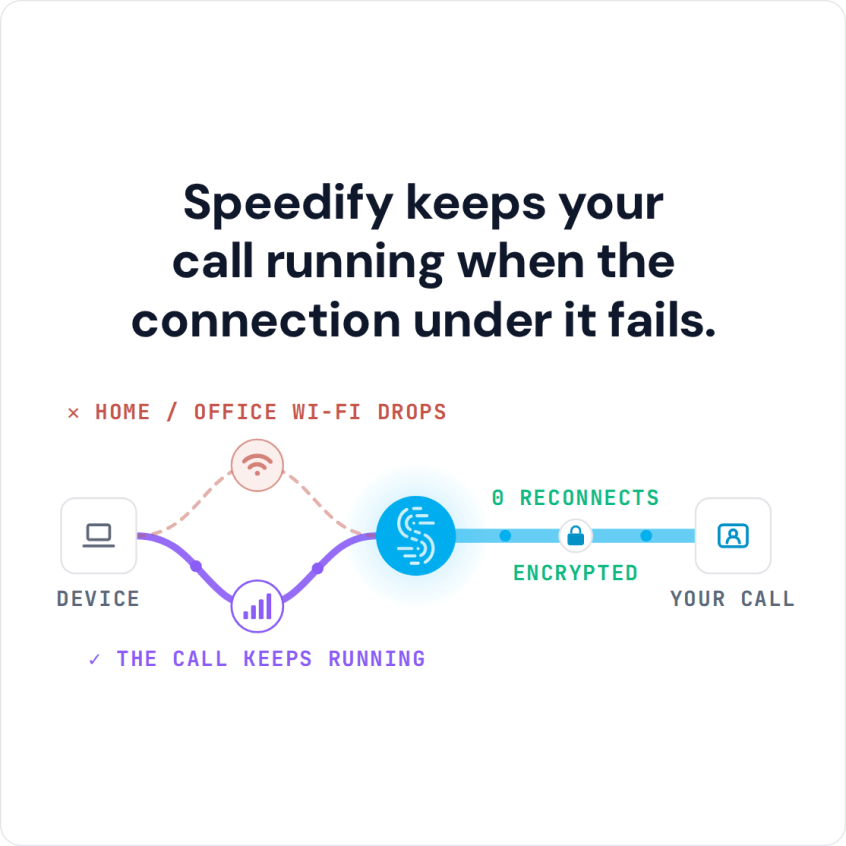
Speedify is an app that keeps Wi-Fi and 4G/5G cellular data both running for you at once, so those brief silences are covered and Zoom has no reason to complain. You will find out below what triggers the message and why using Speedify keeps the warning off your screen.
Speedify keeps your call running when the connection under it fails.
Why Am I Getting the “Please Check Your Network Connection” Message in Zoom?
The most common cause of Zoom network connection issues is the Internet you’re using to connect to their servers. When you have a slow or unreliable Internet connection, Zoom isn’t able to work properly. Sometimes, you may not even realize that you have a connectivity issue until you try and use the service. And it’s most annoying when it happens during an important business call.
Zoom video conferencing uses a lot of bandwidth. Your device is sending a complex set of data packets to the device of the person you are trying to talk to, their device is sending packets of data to you.
If your Wi-Fi connection has a momentary blip or your cellular connection fluctuates, some of the flow of those packets gets interrupted. It can take a few moments for the data to catch up.
This results in slow Zoom, moments when the audio cuts in and out, where the video lags, and where the audio and video don’t sync properly. It can also lead to Zoom disconnecting. All in all – you get the dreaded Zoom “please check your network connection” error.
Avoid Getting into Network Connection Errors. Use Speedify for Fast, Reliable Internet
Zoom will perform as good as your Internet can perform. At this time, whether you’re using a laptop, a desktop computer or a mobile device, it only uses one connection at a time. Even though you may be connected to both WiFi and cellular data on your smartphone, it’ll use only one of them. So, the solution for fast, reliable and secure Internet is simple: use a secure channel bonding service, like Speedify.
Speedify improves the performance of Zoom meetings. That’s because it improves your Internet connection. The Speedify app works by monitoring the quality of your Internet connections in the background and can bond all available connections simultaneously in a single “pipe”. This improves your bandwidth and connection reliability, fixing Zoom network connection issues and leading to a smoother and fault-free conference.
If your home Internet suddenly drops and you’re also connected to a cellular network, for example, you will stay connected seamlessly because Speedify intelligently and automatically reroutes your data until you are connected again to both networks. Best of all, you don’t notice anything because Speedify takes care of it all in the background.
Get All Three in One: Speed, Reliability and Security with Speedify. This Means No More “Please Check Your Internet Connection” Messages from Zoom
Speedify is a fast bonding VPN. This means that along with using channel bonding technology, it also encrypts all traffic. This is very important when working from home. Think about it – you’re accessing sensitive business data. You wouldn’t want that to fall into the wrong hands. By using Speedify, your data and privacy will be safe from hackers and cyber criminals.
Speedify is an essential element to prevent Zoom network connection problems. It’s available for individual use on up to 5 devices on all major platforms (Windows, macOS, Android, iOS, Linux). But there’s also Speedify for Teams, with more add-ons, such as dedicated servers.
Get Speedify today and start enjoying hassle-free Zoom meetings with no “please check your network connection” errors!
Speedify
Get started with Speedify today.
Combine Wi-Fi, 4G/5G cellular, Ethernet, Starlink, and more into one faster, steadier connection. Free to try — no credit card required.
🚀 Speed
Faster uploads and downloads by bonding all your connections at once.
📶 Stability
Automatic failover in under a second when any connection drops.
🔒 Security
AES-256 encryption on every connection, on every network you join.



15M+ downloads worldwide. 75K+ five-star reviews on iOS and Android.