
Can You Stream Video at a Professional Level with an iPhone 12 or Newer?
Your iPhone camera is already good enough to broadcast professionally: the part that lets you down is the single cellular signal it uploads through, which thins out in crowds and dead spots. Dedicated streaming cameras get around that with hardware that feeds them several internet connections at once.
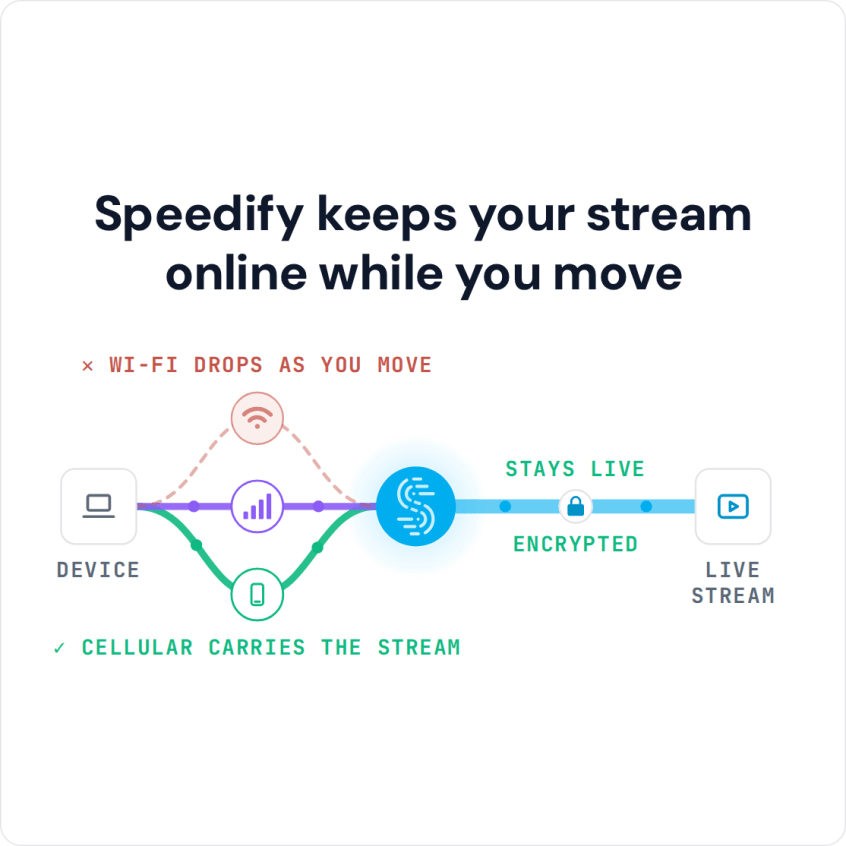
Speedify does the same job in software on iOS, using your Wi-Fi and 4G/5G cellular together so the upload holds steady when the cellular signal weakens. Speedify needs both connections on for that; on one connection it works as an encrypted VPN and cannot stop that connection from dropping. Read on for the settings and accessories that make iPhone streaming look professional, and for how running Speedify on the phone keeps the broadcast from cutting out mid-shot.
Speedify keeps your stream online while you move
Reliable Internet Connectivity: Essential for Professional Streaming from iPhone 12 and Newer
A video professional’s streaming kit should include a solution for fast and reliable internet. This is usually dedicated hardware for combining connections: a powered box where you plug in several cellular SIM cards, USB dongles and other internet connections.
That hardware combines all the internet connections into one larger pipe for the live streaming video. You connect your streaming device or camera to the Wi-Fi hotspot the hardware creates and start broadcasting live.
The most convenient way to do that when you’re live streaming from your iPhone 12 or newer is a software-only solution for combining connections like Speedify.
How to Get Fast and Reliable Internet when Streaming from iPhone
When you’re live streaming from your iPhone 12 or newer, it’s only natural to have all the streaming elements on your smartphone. This includes any accessories, the live streaming app and the software that combines your internet connections.
Speedify is a software-only solution you can run directly on your iPhone when live streaming. Speedify combines your Wi-Fi and cellular connections together simultaneously to deliver fast and reliable internet. If you’ve got a wired Ethernet connection at hand (through a USB-C or Lightning Ethernet adapter), you can add that too and have 3 connections combined on your iPhone.
When compared to dedicated hardware for combining connections (e.g. LiveU, Peplink, Mushroom Networks), here are the benefits Speedify brings to the table:
- it’s completely portable: you don’t need additional power or a bag to carry it. Speedify runs on your iPhone directly.
- with a Speedify Dedicated Server, Speedify handles up to 1 Gbps of data, which can help with file transfers alongside the live stream.
- it delivers a much higher value for money, with plans as low as $4.99 per month on a 3-year plan.
Speedify Combines Internet Connections for Professional Streaming from an iPhone 12 or Newer
Speedify is a fast VPN that combines internet connections, so you can use all of your Internet connections at the same time for speed, stability and security. With more than one internet connection, Speedify’s automatic failover protection keeps you online when one of them drops.
Creating an Internet “super-pipe” that provides increased speed and reliability on your iPhone is especially important when:
- working remotely: fewer pixelated or buffering moments in video conferences, and being in touch with your colleagues in real time, not waiting for messages or attachments to go through.
- live streaming: Speedify prioritizes live streams over other types of Internet traffic, so your Twitch, YouTube or other streams get the bandwidth first.
- online gaming: a glitch on one internet connection does not throw you out of the game, because Speedify moves the traffic to your other connection. With two or more connections in Redundant Mode, Speedify sends each packet over every connection and uses the copy that arrives first, so your ping follows whichever connection is faster at that moment.
That is why Speedify belongs in a professional iPhone streaming kit.
Speedify
Get started with Speedify today.
Speedify combines Wi-Fi, 4G/5G cellular, Ethernet, Starlink and satellite into one faster, more reliable internet connection. Free to try: 5 GB a month with a free account. No credit card required.
🚀 Speed
Faster uploads and downloads, because Speedify uses all your internet connections at once.
📶 Stability
If one internet connection drops, Speedify moves your traffic to the others in milliseconds.
🔒 Security
AES-256 encryption on every internet connection, on any network you join.



15M+ downloads worldwide. 75K+ five-star reviews on iOS and Android.