
Why is Twitch Buffering while YouTube is Working
Buffering on Twitch while YouTube plays perfectly over the same internet connection is a very common complaint, and it is not imagined: the two platforms ask different things of your internet connection. Twitch needs a steadier flow of data and reacts badly to brief slowdowns.
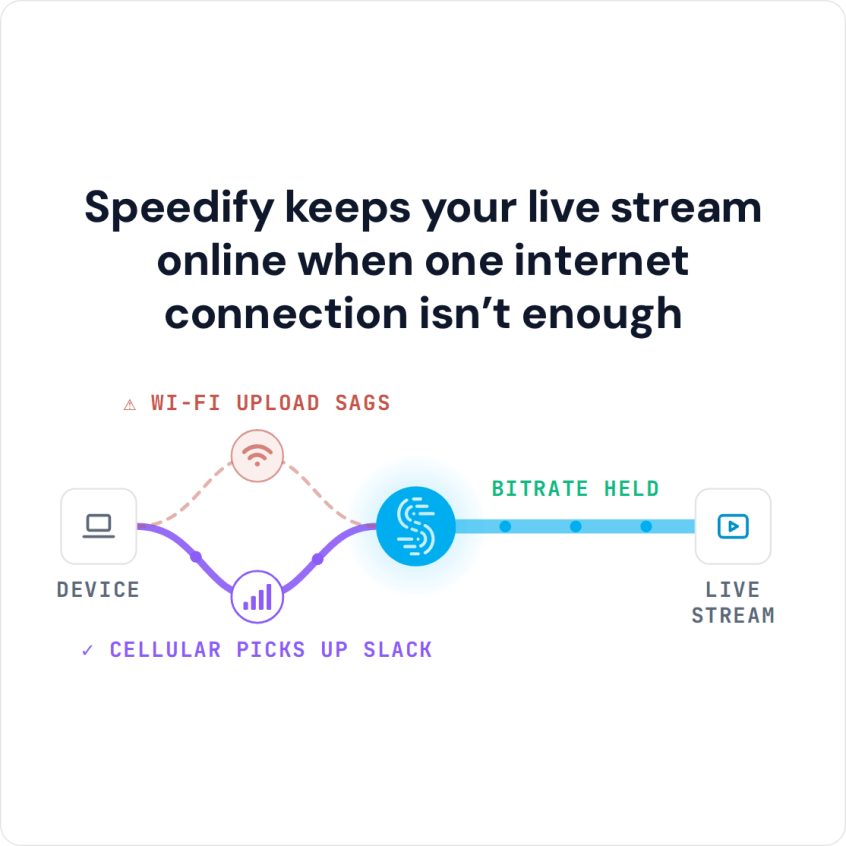
Speedify is an app that receives video over Wi-Fi, 4G/5G cellular, wired Ethernet, Starlink and other internet connections together, smoothing over the moments Twitch will not tolerate. On a single connection, Speedify works as an encrypted VPN and cannot stop that connection from dropping. This comparison breaks down the bandwidth and lag differences between Twitch and YouTube gaming, and shows how using Speedify reduces Twitch buffering even when your internet connection tests fine.
Twitch vs YouTube Gaming for Viewers: The Technical Differences
Both platforms are used for live streaming. Leaving aside the community sizes, this section looks at the technical aspects that influence the quality of the streams.
Bandwidth Needed for Twitch vs YouTube Gaming
According to the Twitch Broadcasting Guidelines, gaming streamers need up to 6000 kbps bandwidth to broadcast a full HD 1920×1080 px video with 60 fps.
One can easily see the superior experience of YouTube when it comes to streaming videos: they allow streamers to broadcast at up to 4k resolution (3840×2160 px) with a rate of 60 fps and a maximum bitrate of 51000 kbps (!).
On the viewers’ side, this translates to at most the same bandwidth needed to watch the Twitch stream. The actual needed bandwidth depends on whether the stream can be watched in multiple qualities and bitrates, an option which is always available on YouTube, and only sometimes available on Twitch.
Neither platform uses more data by itself: data use follows the quality you watch. At Twitch’s recommended 6,000 kbps for 1080p at 60 fps, a stream uses up to about 2.7 GB an hour, and picking a lower quality in the player cuts that. YouTube works the same way.
Latency on Twitch vs YouTube Gaming
Twitch also added a low latency video mode. During its beta, streamers reported latencies as low as 1 second compared to the 7-8 seconds before.
When it comes to latency, YouTube is also ahead of Twitch, as they offer normal, low and ultra-low latency choices for streamers.
Bottom line: the lower the latency the streamer picks, the higher the chances of buffering for the viewers.
Twitch Buffering but Internet Is Fine: Why YouTube Still Plays
As explained above, this is the most common comparison streamers make between Twitch vs YouTube Gaming. To get to the bottom of this, first you’ll want to run some diagnostics.
Begin by running an online speed test. Do the download/upload speeds you get from your ISP qualify for watching the live streaming videos with the bandwidth and latency specs above? If so, there are three possibilities:
- Your ISP may have temporary peering issues with Twitch. Usually these should not last for more than a couple of days, but be sure to ping your ISP and let them know about this.
- Your ISP may be throttling your connection. Since watching Twitch streams can require a lot of bandwidth, ISPs may try to limit users in the sense of not allowing more than a certain bandwidth to be used with Twitch servers. So, you’ll be able to watch high-resolution live streams only if you have quality control choices in your Twitch or YouTube player.
- Twitch may be having issues with their server infrastructure. You should confirm if this is the case before calling your ISP: use another connection (e.g. your cellular 4G/LTE) to watch a short fragment of the stream and see if it’s buffering.
Twitch vs YouTube Gaming: Speedify Adds Bandwidth and Failover
Speedify is a mobile VPN that combines connections: it can combine 2 or more Internet connections at the same time, so you get more of the bandwidth you need to stream from platforms like Twitch and YouTube. As a connection combining solution, Speedify also gives you Internet failover protection when one connection drops. In Redundant Mode, latency follows whichever of your connections is faster at that moment, but Speedify cannot shorten the route to Twitch’s servers.
There are many VPN alternatives out there, and they all do the basic stuff: encrypting your online data so your ISP cannot see what you watch, which can also get around data throttling. But when it comes to bandwidth-hungry applications like live audio and video streaming, Twitch or YouTube online gaming, business calls, other VPNs slow down your connection, as all the traffic has to be encrypted before being transmitted. Speedify is different: with two or more internet connections, Speedify adds speed while it encrypts; on a single connection, Speedify can be a little slower.
Twitch vs YouTube Gaming: Don’t have enough bandwidth to watch your favorite live streams at high quality? Is your ISP limiting your Internet connection? It all ends up with buffering. It’s time you take a stand. Get started with Speedify. Not only will you be able to use all your bandwidth, you will also benefit from online security and privacy, and increased Internet reliability.
Speedify
Get started with Speedify today.
Speedify combines Wi-Fi, 4G/5G cellular, Ethernet, Starlink and satellite into one faster, more reliable internet connection. Free to try: 5 GB a month with a free account. No credit card required.
🚀 Speed
Faster uploads and downloads, because Speedify uses all your internet connections at once.
📶 Stability
If one internet connection drops, Speedify moves your traffic to the others in milliseconds.
🔒 Security
AES-256 encryption on every internet connection, on any network you join.



15M+ downloads worldwide. 75K+ five-star reviews on iOS and Android.