
A Starlink bonding router uses a Starlink internet connection together with 4G/5G cellular (LTE), Wi-Fi or Ethernet as one faster internet connection that stays up when one of them drops. Peplink, Cradlepoint and others sell hardware for this. Speedify does the same in software, on devices you already have or on a Powered by Speedify router. Some routers only load balance instead, sending each app over one internet connection; see how load balancing differs from combining on Starlink.
For a business running on Starlink, one dropped internet connection means stalled card payments, dropped calls and idle staff. Speedify uses Starlink together with 4G/5G cellular, Ethernet, Wi-Fi and a second Starlink dish, and switches traffic to the others when one drops. Below: how Speedify does it, how to deploy it, and how Speedify compares with nine other products that combine Starlink with other internet connections. Book a demo with the Speedify team.
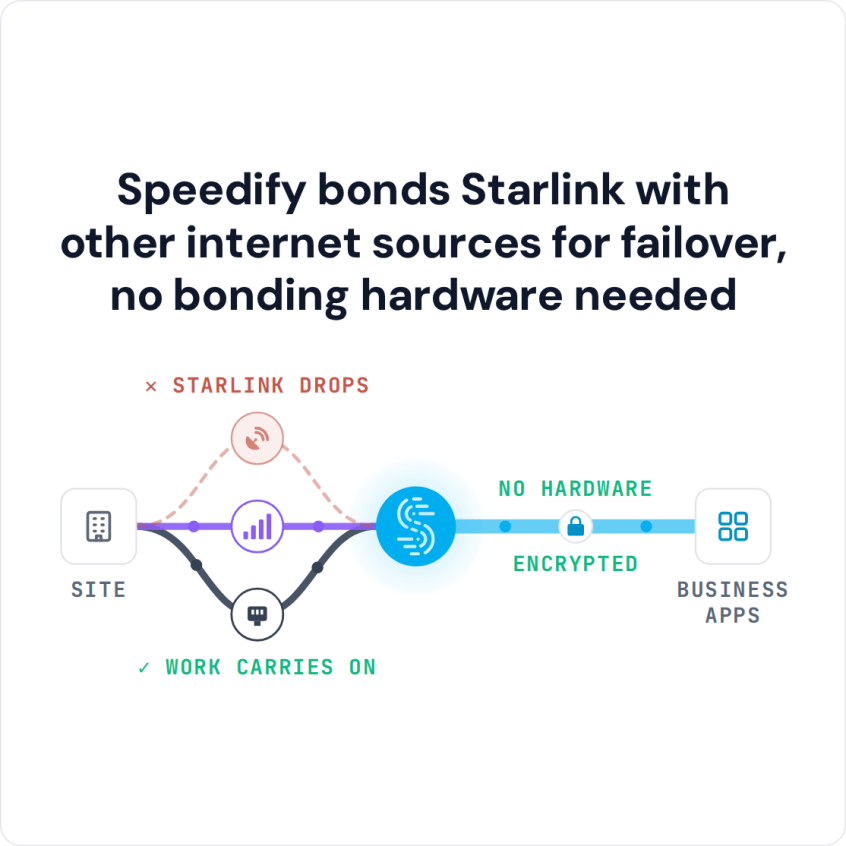
Speedify bonds Starlink with other internet sources for failover, no bonding hardware needed
Watch now
How Speedify combines internet connections on any hardware
Get started with Speedify for your business
Speedify offers three commercial paths. They work together, and most enterprise customers use two or more.
01
Speedify Teams
Speedify on every supported OS for every team member
Centralized dashboard for billing, user provisioning, and usage analytics
CSV import/export and a RESTful management API
02
Speedify for Routers
License for supported OpenWrt routers
Powered by Speedify hardware lineup ready to deploy out of the box
Miri, GL.iNet and other partner models
Covers every device on the network, with no per-device install
03
Embed Speedify into your product
A · DIY
Build it yourself with the Speedify SDK.
Integrate Speedify into your iOS, Android, Windows, macOS, Linux or QNX product. Full developer documentation, sample code and supported integration paths. Your team owns the build, and the Speedify SDK handles combining the internet connections.
B · CUSTOM ENGINEERING
Have the Speedify team build it for you.
How Speedify Combines Starlink with Other Internet Connections
Speedify connects each device to Speedify servers in more than 50 locations, then splits your traffic in small pieces across every internet connection you have, all at once. That’s different from a router that sends each call or download down one internet connection and only switches when that one fails.
A single download, upload or video stream uses the combined speed of all your internet connections, close to the speeds added together. When one internet connection weakens or drops, Speedify moves its traffic to the others without dropping the call or restarting the upload.
Speedify needs at least two internet connections. With one Starlink dish alone, Speedify can’t make downloads and uploads faster or stop Starlink’s short dropouts.
For Starlink, businesses use three setups, covered in detail in how Speedify combines multiple Starlink dishes for business:
- Two Starlink dishes together. Both Starlink dishes work at once. Speedify spreads traffic across both and moves it to the other automatically if something blocks one.
- Starlink plus 4G/5G cellular, Wi-Fi or Ethernet. Starlink carries most of the traffic, and the ground-based internet connection fills the short gaps when the Starlink dish switches satellites or something blocks its view.
- Two Starlink dishes plus 4G/5G cellular. Three internet connections at once, the most protection from drops you can get without a wired line.
Two features set Speedify apart from the hardware makers. Speedify’s Starlink Control Center shows a live view of each Starlink dish: the obstruction map, download and upload speed, ping (the delay to Starlink’s ground station), time online, and alerts when the motor is stuck, the mounting pole isn’t straight or the dish is overheating. At sites with several Starlink dishes, Speedify shows all of them side by side.
Speedify’s cellular sharing lets several Speedify users on the same local network share their 4G/5G cellular connections over Wi-Fi, with no cables and no hotspot setup. A field crew combines the cellular connections of the phones already on site into one internet connection.
Ways to Deploy Speedify for a Business on Starlink
Speedify runs as software, so there’s no special appliance to buy. There are three ways to deploy it:
- The Speedify app: runs on Windows, Mac, Linux, iOS, Android and supported OpenWrt routers, so Speedify works on the device that needs it. Speedify Teams adds central account, user and policy management for a business, on those same devices.
- Powered by Speedify routers: Speedify on OpenWrt, GL.iNet or Miri router hardware, to cover a whole site or vehicle network. See the list of supported routers.
- Speedify SDK: build Speedify directly into your own app or hardware product.
You don’t need a private server to start: Speedify’s own servers handle that by default. Two add-ons work with any Speedify plan for businesses that want control over where their traffic leaves the internet and where their data lives: Speedify Dedicated Servers and Speedify Self-Hosted Servers. See Speedify server infrastructure.
How Speedify Compares with Other Routers and Services That Combine Starlink
Every product below can use Starlink together with other internet connections in some form. They differ in what you have to buy, where the work happens, how much Starlink-specific tooling you get, and what you install. The table marks where Speedify comes out ahead.
| Solution | How it combines internet connections | Hardware required | Starlink Control Center (live Starlink dish status) | Cellular sharing across devices | What you install |
|---|---|---|---|---|---|
| Speedify | Splits each call and download across all internet connections, for close to their combined speed. | None | Yes | Yes | Software on existing devices |
| Peplink (SpeedFusion) | Splits traffic across internet connections (SpeedFusion) | Yes | No | No | Proprietary routers plus cloud |
| Bondix (S.A.NE) | Splits traffic across internet connections, on a router | Yes, a supported router | No | No | Software on a supported router |
| Mushroom Networks | Combines internet connections in its own box (Broadband Bonding) | Yes | No | No | Dedicated appliance at each site |
| Viprinet | Combines internet connections through a VPN between two Viprinet devices | Yes, at both ends | No | No | Router on site plus a Hub at the core |
| Dejero | Combines internet connections (Smart Blending) | Yes | No | No | Dedicated hardware kits |
| LiveU | Combines internet connections for live video (LRT) | Yes | No | No | Broadcast hardware encoders |
| TVU Networks | Combines internet connections for live video (IS+) | Yes | No | No | Broadcast hardware transmitters |
| Cradlepoint (Ericsson) | Sends each app over one internet connection; combining them needs an extra service | Yes | No | No | Cellular routers plus NetCloud |
| OpenMPTCProuter | Combines internet connections through a server you rent and run yourself | Yes, router plus a self-run VPS | No | No | Open-source router plus a VPS |
Speedify vs. Each Competitor for Combining Starlink, One by One
- Speedify vs. Peplink: the software alternative to Peplink’s SpeedFusion, with no Peplink router to buy.
- Speedify vs. Bondix: Speedify runs on laptops, phones and supported routers, not only on a router.
- Speedify vs. Mushroom Networks: the same result with no appliance at each site.
- Speedify vs. Viprinet: software, with no hardware at either end.
- Speedify vs. Dejero: business internet without paying for broadcast hardware.
- Speedify vs. LiveU: combining Starlink for business without broadcast video encoders.
- Speedify vs. TVU Networks: combining Starlink in software for everyday business use, not just live broadcasts.
- Speedify vs. Cradlepoint: splits each call across all internet connections, without enterprise router hardware.
- Speedify vs. OpenMPTCProuter: a supported product instead of a do-it-yourself build.
Why Businesses Choose Speedify to Combine Starlink with Other Internet Connections
Speedify combines multiple Starlink dishes, or Starlink with 4G/5G cellular, Wi-Fi and Ethernet, and uses all of them at the same time, as software on the devices and routers a business already has. There’s no box to install, nothing proprietary to order, and nothing to wait on.
Speedify has been in use since 2014. Because Speedify is software, a business can take a Starlink site from one fragile internet connection to one that keeps working when a Starlink dish drops, without new hardware at every site.
To plan Speedify for your Starlink sites, Contact Us and book a demo. To try it first, download Speedify and test it at one Starlink site, or see how Speedify combines internet connections for business.
Speedify Business Solutions
Speedify Teams
Speedify for Routers

Speedify Embedded Solutions and Integrations
Add Speedify to your own app or hardware with the Speedify SDK. Your product then combines internet connections, fails over automatically when one drops, and encrypts the traffic, using the same technology as the Speedify app.