
Cradlepoint routers, made by Ericsson, can use Starlink as one of their internet connections alongside cellular. By default, a Cradlepoint router sends each app or session over one internet connection at a time and switches to another when one fails. That is load balancing; see how Starlink load balancing differs from combining internet connections. Combining the speed of Starlink and cellular in a single download comes through Cradlepoint’s NetCloud services. Speedify combines them out of the box, in software, on the laptops, phones and routers your business already has.
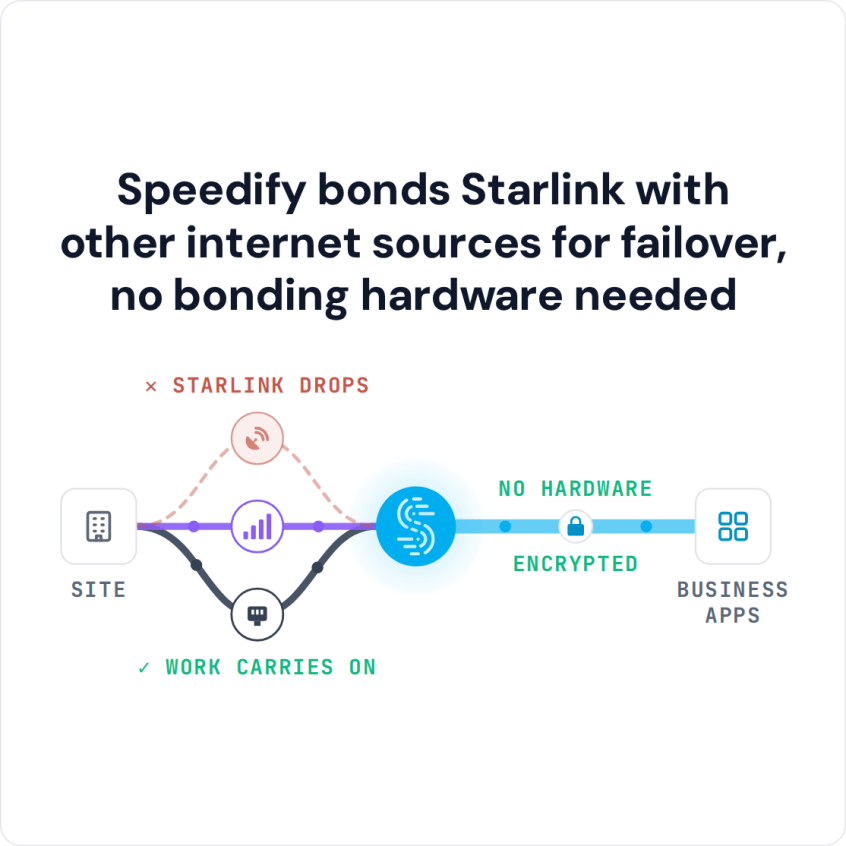
Speedify bonds Starlink with other internet sources for failover, no bonding hardware needed
Below: how each one works with Starlink, a side-by-side table, and which Speedify setup fits a business looking for a Cradlepoint alternative. To talk through your own sites, contact the Speedify team.
Watch now
How Speedify's channel bonding technology works on any hardware
Get started with Speedify for your business
Speedify offers three commercial paths. They're not exclusive — most enterprise customers combine two or more.
01
Speedify Teams
Speedify on every supported OS for every team member
Centralized dashboard for billing, user provisioning, and usage analytics
CSV import/export and a RESTful management API
02
Speedify for Routers
License for supported OpenWrt routers
Powered by Speedify hardware lineup ready to deploy out of the box
Miri, GL.iNET, and other partner models
Whole-LAN bonding without per-device install
03
Embed Speedify into your product
A · DIY
Build it yourself with the Speedify SDK.
Integrate Speedify into your iOS, Android, Windows, macOS, Linux, or QNX product. Full developer documentation, sample code, and supported integration paths. You own the build, we provide the bonding stack.
B · CUSTOM ENGINEERING
Have us build it for you.
How Speedify Combines Starlink and Cellular in Software
Speedify sends your internet traffic over every internet connection you have at the same time: Wi-Fi, 4G/5G cellular, Ethernet, Starlink and satellite. Speedify’s servers around the world put the pieces back together, so a single download, upload, call or stream gets nearly the full speed of all your internet connections combined.
Splitting traffic this way gives a different result from spreading apps across internet connections. When a router gives each session its own internet connection, one large upload still moves at the speed of one internet connection, and a call on the failing internet connection drops. Speedify splits even one upload across all of them, and when one internet connection drops, Speedify moves your traffic to the others automatically, so the call keeps going.
Speedify needs at least two internet connections to do this. With one Starlink dish and nothing else, it can’t make downloads and uploads faster or stop dropouts.
Cradlepoint’s combining lives in Cradlepoint router hardware plus a cloud subscription. Speedify runs on Windows, macOS, Linux, iOS, Android and supported OpenWrt routers, so your business uses Starlink and cellular together on devices it already runs, with no router to buy for every site.
Speedify also has tools made for Starlink. Speedify’s Starlink Control Center shows each Starlink dish’s live status, speed, ping, obstructions, uptime and alerts, for several Starlink dishes at once. Speedify’s cellular sharing lets people on the same Wi-Fi pair their phones and add each phone’s 4G/5G cellular as one more internet connection. Running Starlink and cellular as one connection is known as WAN aggregation for Starlink.
Speedify vs. Cradlepoint for Starlink: Side-by-Side Comparison
| What you’re comparing | Cradlepoint (Ericsson) | Speedify |
|---|---|---|
| How it uses several internet connections | Sends each app over one connection and switches on failure, with combining through NetCloud | Splits data across all connections by default, for nearly their full speed combined |
| Combines speed in a single download by default | Through NetCloud services | Yes, out of the box |
| Hardware you need | Yes, a Cradlepoint router, plus a NetCloud subscription | None, install an app |
| Runs on phones, laptops and servers | No, business routers | Yes, Windows, macOS, Linux, iOS, Android |
| Uses Starlink with cellular, Wi-Fi, Ethernet | Yes | Yes |
| Managing many sites from one place | NetCloud Manager | Speedify Teams |
| Time to get the first site online | Buy and set up hardware | Install an app |
Which Speedify Setup Fits a Business Looking for a Cradlepoint Alternative
A business looking at Cradlepoint usually wants cellular and Starlink working together at many sites or in vehicles. The Speedify setup that matches is the Speedify app on the devices at each site, or a Powered by Speedify router when one box should cover a whole site or vehicle, with Speedify Teams managing all of it from one dashboard.
If your traffic has to leave from a server you control, add Speedify Dedicated Servers or Speedify Self-Hosted Servers to any plan. See Speedify’s server options.
More Comparisons of Speedify and Other Starlink Options for Business
See how Speedify compares with other ways to use Starlink together with other internet connections at a business.
- Every Starlink option for business compared with Speedify
- Speedify vs. Peplink
- Speedify vs. Bondix
- Speedify vs. Mushroom Networks
- Speedify vs. Viprinet
- Speedify vs. Dejero
- Speedify vs. LiveU
- Speedify vs. TVU Networks
- Speedify vs. OpenMPTCProuter
Speedify Is Used on Millions of Devices Worldwide
Speedify has powered stronger Internet for millions of consumers since 2014
15M
Millions of Speedify downloads worldwide, and growing every day5⭐️
More than 75,000 5-star reviews for Speedify in the iOS and Android app stores82
Points of Speedify presence in datacenters around the globe500TB
Hundreds of terabytes of fast, secure data streamed every week via SpeedifySpeedify Partners
Speedify partners with these amazing organizations to deliver better internet and next-generation networking technology to their customers and employees.


The Bottom Line on Speedify vs. Cradlepoint for Starlink
If Starlink is central to your business and you want the speed of Starlink and cellular combined without business router hardware and a cloud subscription, Speedify does it by default, on devices you already own, with Starlink dish status and cellular sharing on top. Speedify makes your internet faster, more reliable, and more secure.
See how Speedify combines internet connections or read how Speedify uses several Starlink dishes at once for business.
Speedify Business Solutions
Speedify Teams
Speedify for Routers

Speedify Embedded Solutions and Integrations
Embed Speedify software into your app or hardware products and leverage the core channel bonding technology of Speedify in new and interesting ways.