
Unbreakable VPN Connectivity App for Android by Combining Wi-Fi and 4G / 5G Cellular with Speedify
Your Android phone spends the day switching between Wi-Fi networks and 4G/5G cellular, and every switch is a moment when an upload stalls or a call cuts out.
Speedify is an app that combines Wi-Fi, 4G/5G cellular, Ethernet, Starlink and satellite internet connections into one faster, more reliable connection, and encrypts your traffic like a VPN. On an Android phone, that encryption covers your mobile data as well as the public Wi-Fi networks you pass through, and Speedify keeps Wi-Fi and 4G/5G cellular running at the same time. The speed and failover gains need both connections on; on a single connection, Speedify works as an encrypted VPN and can be a little slower.
What follows explains what an Android VPN app really protects, what to look for before choosing one, and how the Speedify app gets you private traffic, faster uploads and downloads, and an internet connection that holds when a Wi-Fi hotspot quits.
How a VPN App for Android Protects Your Data on Public Wi-Fi
Data is big money. Everyone from identity thieves to your own ISP wants to know more about you, for purposes from serving you ads to identity theft. The riskiest places for your Android phone are public Wi-Fi networks: even if you lock your phone with a password, your data travels in the open to and from it.
A virtual private network (VPN) service encrypts all of your internet traffic on your device and sends it through a VPN server. If you use a VPN app on your Android smartphone, anyone listening in on the network gets only scrambled data that is of no use to them.
So snoops and hackers on the same network can’t read your passwords or see which sites you are browsing. VPNs keep your data private and secure on your Android phone.
VPN for Mobile Data on Android: When a VPN Helps
A VPN works on 4G/5G cellular the same way as on Wi-Fi: the app encrypts your traffic on the phone before anything leaves it. Strangers cannot join your carrier’s network the way they can join a cafe hotspot, so mobile data is already safer than public Wi-Fi. On mobile data, a VPN mainly keeps your carrier from seeing which sites you visit; the carrier still sees how much data you use.
Encryption adds a little extra data to every packet, so any VPN uses slightly more of your mobile data plan than browsing without one.
Best VPN App for Android: Speed and Stability, the Common Issues of Most VPNs
Most VPNs share two problems: speed and stability.
VPNs are great at securing your data and not so great at letting you use the Internet the way you want. Because of the way VPN technology works, most VPNs slow down your Internet connection, making it tough to stream content or share large files.
VPN connections can also become unstable and frequent disconnects are a major headache.
4 Things to Consider When Choosing the Best VPN App for Android
Here is what to look at when choosing the best VPN app for Android, with speed and stability in mind:
- Location of VPN servers: the closer they are to where you are or where you travel, the faster the connection tends to be. Speedify’s paid plans include servers in more than 50 locations.
- Privacy policy: some VPN providers keep logs of your online activity, especially free VPN services, so read the policy before you choose. Speedify keeps no record of the sites you visit; it records connection metadata such as your IP address, device ID, connection times and data used.
- Ability to use several connections without dropping the VPN session: this is what a VPN that combines internet connections does. Combining connections helps when you move through a busy city center, roam from one Wi-Fi hotspot to another, run into bad Wi-Fi networks, or are traveling.
- Supported devices and operating systems: apart from Android, you may want the VPN app on your laptop or other devices, so make sure it is available for those platforms too. Speedify runs on Android 9 or later, iOS, Windows, macOS and Linux.
Speedify for Android: Wi-Fi and 4G/5G Cellular Combined in One VPN App
Many Android users feel they have to choose between security and speed when getting a VPN. With Speedify and two internet connections, such as Wi-Fi and 4G/5G cellular, you can have both.
Speedify’s technology for combining internet connections (a form of link aggregation) lets it use multiple connections at the same time, which makes Speedify connections faster and more reliable.
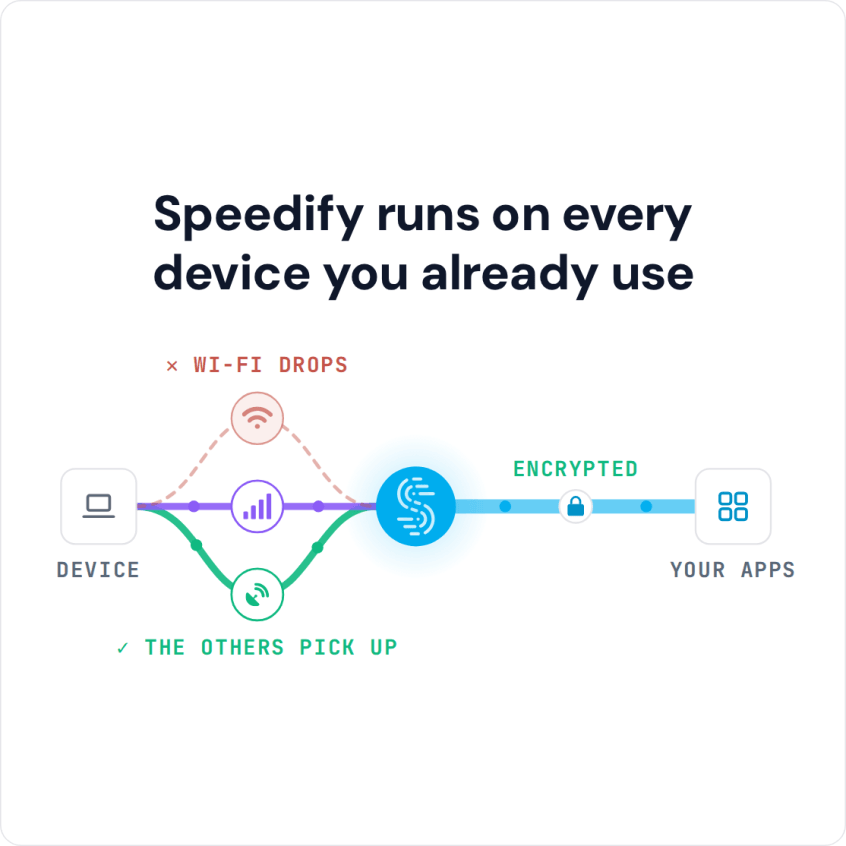
On your Android smartphone, Speedify connects to the Internet over Wi-Fi and 4G/5G cellular simultaneously, which gives your apps more bandwidth for downloads and uploads. Combining uses cellular data, so you can set a data cap on the cellular connection in the app.
Speedify also has auto failover: it monitors the quality of your connections, and if one becomes unstable, moves your traffic to the other connection so you stay connected, then uses the first one again once it recovers. Your public IP address stays the same through the switch, so calls and logged-in apps carry on, and all of this happens in the background.
Download Speedify from the Google Play Store and create a free account, which includes 5 GB per month.
Speedify
Get started with Speedify today.
Speedify combines Wi-Fi, 4G/5G cellular, Ethernet, Starlink and satellite into one faster, more reliable internet connection. Free to try: 5 GB a month with a free account. No credit card required.
🚀 Speed
Faster uploads and downloads, because Speedify uses all your internet connections at once.
📶 Stability
If one internet connection drops, Speedify moves your traffic to the others in milliseconds.
🔒 Security
AES-256 encryption on every internet connection, on any network you join.



15M+ downloads worldwide. 75K+ five-star reviews on iOS and Android.