
Twitch Mobile Stream Setup – What You Need for Your IRL Streaming
Choppy video and buffering during a mobile Twitch stream point at the internet connection rather than the camera: one cellular signal, changing from street to street, cannot always hold a steady upload.
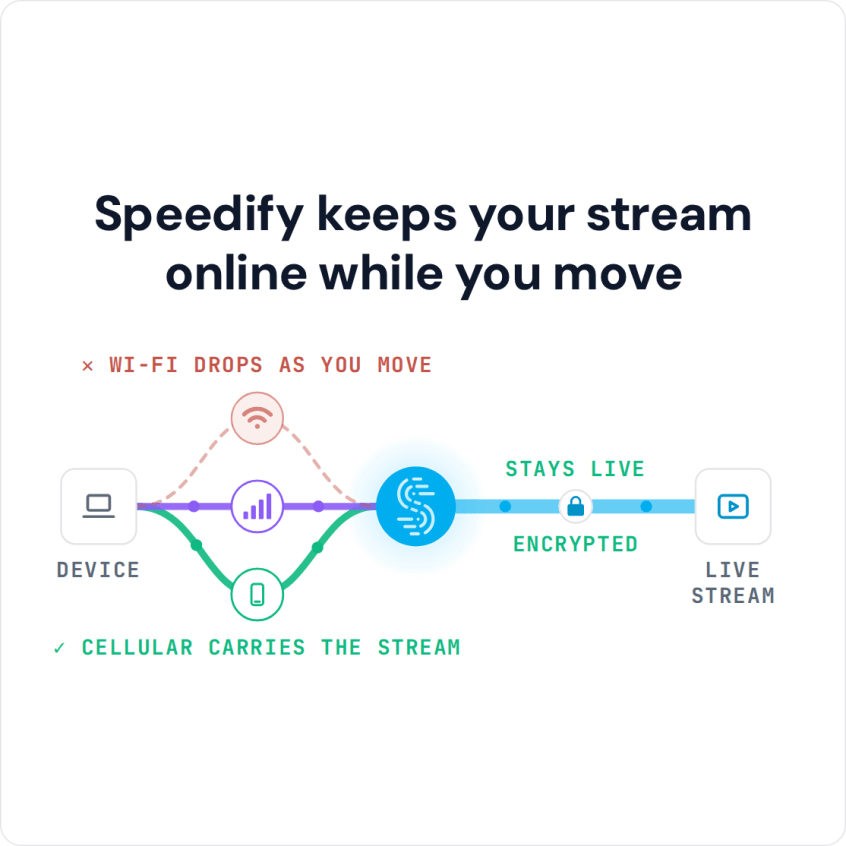
Speedify is an app that lets a phone or laptop draw on two or more internet connections at the same time (Wi-Fi, 4G/5G cellular, Ethernet, Starlink and satellite), so your outgoing video keeps flowing when one of those cellular signals weakens. With only one internet connection, Speedify works as an encrypted VPN and cannot stop that connection from dropping, so an IRL stream setup needs at least two (for example two cellular modems on different carriers, or a phone’s 4G/5G cellular plus Wi-Fi). Below, each piece of an IRL stream setup gets its turn, the internet reliability question gets a straight answer, and Speedify is compared against hardware services you might buy instead.
Speedify keeps your stream online while you move
IRL Stream Setup: Tackling the Internet Reliability Issue
Almost every streamer runs into unreliable internet at some point, and it’s most annoying when you’re streaming live to your followers.
The most common situations where you might encounter these type of connectivity issues live streams include:
- When traveling or on the go: on the street, a bus or a train. You may be connected to a bad / spotty WiFi hotspot.
- In crowded areas: the available bandwidth on both WiFi and cellular connections may not be enough to serve everyone at a stadium, a concert or a frat house party.
- At home: your ISP may be doing maintenance work right when you’re broadcasting live, or throttling your connection.
Here’s what happens: if the connection is unreliable, you may not be able to stream at a high resolution because bandwidth is limited, so your videos may appear jittery or choppy. And if your connection is spotty and disconnects, you lose many of your viewers, at least for that stream.
So your IRL stream setup needs to handle unfriendly internet conditions while streaming live.
What You Need for Your IRL Stream Setup
IRL streaming (short for “in real life”) means broadcasting live while you move around outside instead of sitting at a desk. You can go ahead and live stream IRL from your smartphone, the easiest way to do it. But if you want to level up the quality of your videos, your IRL stream setup should include the following:
- Computer or mobile device for live streaming. For IRL streaming, a smartphone or tablet is the practical choice. You can also use a dedicated streaming device like the LiveU Solo.
- Video camera: it should stream video at 720p / 60 fps or better. Your smartphone camera or the GoPro live streaming feature both work.
- Two or more cellular modems, for a fast and reliable internet connection. Connect them directly to the streaming device, if it supports several USB network adapters, or use a Raspberry Pi as a router that combines internet connections.
- Speedify: lets you combine the connections available to you at once, so the stream keeps going when one of them drops.
- Battery pack: get one with at least 20,000 mAh. Also check the rated power: 100 Wh at most, to avoid issues when traveling by plane.
- Selfie stick or special camera mount for you to hold when streaming. Look for something with a stabilizer for smoother video.
- Backpack or something to carry all this equipment in an organized way. It’s even better if it’s waterproof.
- Streaming apps : these generally depend on the platform you stream to. Twitch, YouTube and Facebook Live each have their own app that should recognize the video camera so you can set it up for live streaming. Others include Streamlabs OBS, Streamyard, Melon, Restream, Ecamm Live and more.
Speedify allows you to use multiple internet connections at the same time. Speedify runs on computers, smartphones, tablets and various devices that run Linux, including Raspberry Pi. Depending on the device, you can combine any mix of two or more Wi-Fi networks, cellular networks and wired networks. Combining them adds an automatic internet failover mechanism for reliability and gives the stream more upload bandwidth. In Redundant Mode, Speedify sends each packet over every connection and uses the copy that arrives first, so latency (ping) follows whichever connection is faster at that moment.
Speedify vs Hardware for Combining Internet Connections in an IRL Stream Setup
Combining internet connections is key to a fast and reliable connection when live streaming, and it is not tied to one architecture. You can choose a mixed hardware-software solution from companies like Peplink and Mushroom Networks, or go with Speedify’s software-only implementation, which you can also deploy on a hardware device of your choice running Linux.
Many people choose solutions built around dedicated hardware, such as multi-WAN routers or SD-WAN networking devices. If you’re planning to adopt a hybrid hardware-software solution, here are some things you should consider.
- Performance: you are limited by the performance of the hardware and sometimes by its software. Your smartphones or computers may be able to go faster, but it won’t make any difference.
- Flexibility: will this solution still be usable if you change something in your current setup?
- Scalability: hardware gets old quickly. Does the solution include free hardware upgrades?
- Cost of implementation: hardware adds a cost to the final solution.
On the other hand, if you choose a software-only solution like Speedify, the benefits are straightforward. The only limitations you’ll have are related to:
- the devices you’re using and what type of network connections they support.
- the speeds of the internet connections you’re planning to combine.
Speedify avoids the flexibility and scalability problems of fixed hardware, and costs a fraction of the price of mixed hardware-software solutions.
Speedify Brings Speed and Security for Your IRL Stream Setup
Speedify also protects you on compromised Wi-Fi networks: Speedify’s encryption keeps other people on the network from reading what you send.
Before Speedify, users often had to choose between security and speed. With two or more internet connections, the combined speed usually makes up for the cost of encryption. You can have both. On a single connection, Speedify can be a little slower, like any VPN.
Cut down on low quality video, buffering and dropped streams when IRL live streaming: carry two internet connections and let Speedify combine them. Get started with Speedify today!
Speedify
Get started with Speedify today.
Speedify combines Wi-Fi, 4G/5G cellular, Ethernet, Starlink and satellite into one faster, more reliable internet connection. Free to try: 5 GB a month with a free account. No credit card required.
🚀 Speed
Faster uploads and downloads, because Speedify uses all your internet connections at once.
📶 Stability
If one internet connection drops, Speedify moves your traffic to the others in milliseconds.
🔒 Security
AES-256 encryption on every internet connection, on any network you join.



15M+ downloads worldwide. 75K+ five-star reviews on iOS and Android.