
Yes, Starlink does go out sometimes. Most Starlink outages are short: a few seconds when something blocks your Starlink dish’s view of the sky, during heavy rain or snow, or when the Starlink dish switches satellites, about every 15 seconds. Now and then Starlink has a wider outage on its side. To see whether Starlink is down, open the Starlink app: it shows your Starlink dish’s status and any outage Starlink has confirmed.
Speedify, an app for computers, phones and routers, keeps a business online through Starlink outages. Speedify uses Starlink together with 4G/5G cellular, Ethernet or Wi-Fi, and moves your traffic to the other internet connection when Starlink drops. With the Starlink internet connection alone, Speedify works as an encrypted VPN and cannot keep a site online when Starlink goes out. Book a demo with the Speedify team.
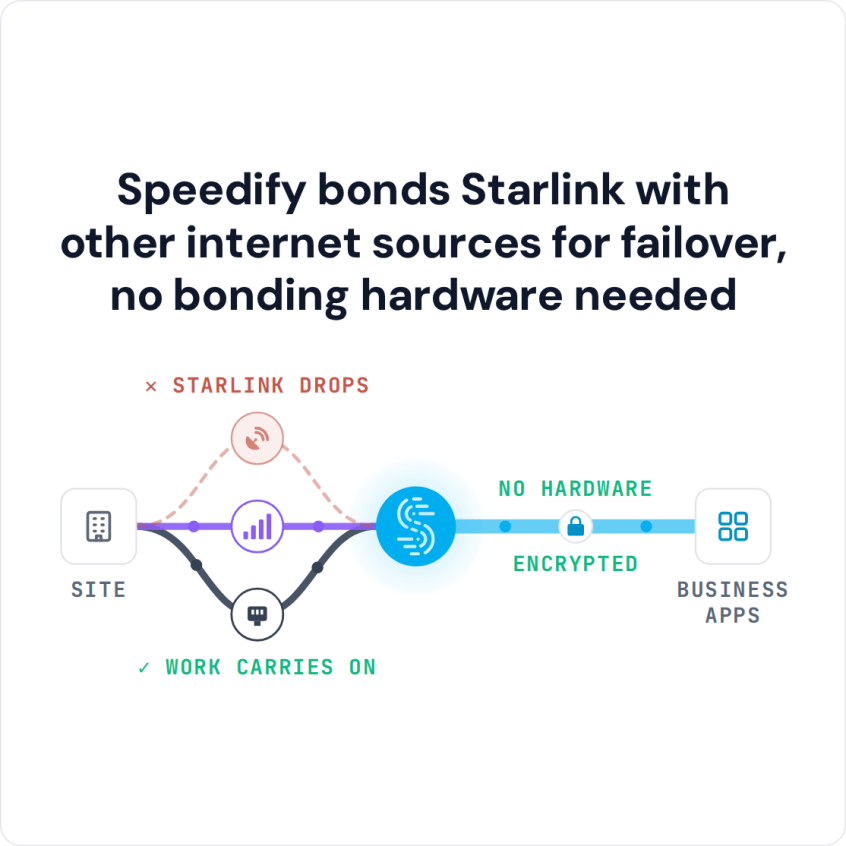
Speedify bonds Starlink with other internet sources for failover, no bonding hardware needed
Watch now
How Speedify combines internet connections on any hardware
Get started with Speedify for your business
Speedify offers three commercial paths. They work together, and most enterprise customers use two or more.
01
Speedify Teams
Speedify on every supported OS for every team member
Centralized dashboard for billing, user provisioning, and usage analytics
CSV import/export and a RESTful management API
02
Speedify for Routers
License for supported OpenWrt routers
Powered by Speedify hardware lineup ready to deploy out of the box
Miri, GL.iNet and other partner models
Covers every device on the network, with no per-device install
03
Embed Speedify into your product
A · DIY
Build it yourself with the Speedify SDK.
Integrate Speedify into your iOS, Android, Windows, macOS, Linux or QNX product. Full developer documentation, sample code and supported integration paths. Your team owns the build, and the Speedify SDK handles combining the internet connections.
B · CUSTOM ENGINEERING
Have the Speedify team build it for you.
Check Whether Starlink Is Down or Your Starlink Dish Has a Problem
Before you plan around outages, find out what kind you have. Open the Starlink app, or type dishy.starlink.com or 192.168.100.1 into a web browser while you’re on your Starlink Wi-Fi. If the Starlink app reports an outage or a network issue on Starlink’s side, there’s nothing to fix at your site. If it says your Starlink dish is obstructed, is still searching for satellites, or shows an alert, the problem is at your Starlink dish. What each Starlink status means explains every one, and why your Starlink isn’t working walks through the fixes.
Why Starlink Goes Out, and What Each Outage Costs a Business
Speedify’s Starlink Index measured 4,273 Starlink dishes in 161 countries from 29 September to 12 October 2026. Starlink was working 96.77% of the time, which is about 46 minutes offline a day: about 37 minutes for fixed Starlink dishes and 61 for Starlink dishes on the move.
Starlink outages usually come from a handful of causes:
- Weather: Heavy rain, snow or thick cloud can weaken the Starlink signal or cut it for a while
- Something in the way: Trees, roofs or buildings blocking part of the Starlink dish’s view of the sky cause drops that come and go
- Satellite switches: Short gaps when the Starlink dish switches from one satellite to the next
- A busy network: Slower speeds at busy times of day in crowded areas
- Maintenance: Occasional planned breaks while Starlink updates its systems
For a business, each of those turns into a real problem:
- Work stops when cloud systems can’t be reached
- Card payments fail at the checkout
- Inventory and delivery records fall out of sync
- Monitoring systems go offline, which can break compliance rules
- Sales are lost while customer-facing systems are down
How Speedify Keeps Your Business Online When Starlink Goes Out
Speedify, on your devices or on Powered by Speedify routers, keeps a Starlink outage from stopping your business:
- Several internet connections at once: Speedify uses Starlink together with a second Starlink dish, 4G/5G cellular or a wired broadband line, all at the same time
- An automatic switch: When Starlink starts to drop, Speedify moves your traffic to the other internet connections right away
- Nothing restarts: Calls, video meetings and app sessions stay open while traffic moves from one internet connection to another
- Calls first: Streaming mode, on by default, puts calls, video meetings and live streams ahead of other traffic when Starlink is only partly working
- Starlink back in use: When Starlink comes back, Speedify starts using it again on its own
A router that only switches internet connections after it notices one is down can take seconds or minutes, and every call and download on it restarts. Speedify splits your traffic across all your internet connections all the time, so when Starlink drops, the rest of the traffic is already on the other internet connection, usually before apps notice anything.
Speedify needs a second internet connection to do this. With a Starlink dish alone, Speedify can’t keep you online when Starlink goes out. A second Starlink dish helps when one is blocked or fails, but every Starlink dish switches satellites on the same 15-second schedule, so only 4G/5G cellular or a wired line covers those short gaps.
Ways to Set Up Speedify So Starlink Outages Don’t Stop Your Business
Businesses set up Speedify in one of two ways:
Option 1, a router running Speedify: Supported OpenWrt and Linux routers, and ready-made routers with Speedify built in, are the quickest to set up. They have:
- Several internet ports for Starlink dishes
- Built-in or plug-in cellular modems
- Settings pages built for IT teams
Option 2, Speedify on your own Linux server: For businesses that already have a network in place, Speedify can run on your own hardware:
- Install Speedify on a dedicated Linux server
- Set the server up as the gateway that all network traffic goes through
- Connect all your internet connections to the server
- Point your existing network equipment at the server
Either way, Starlink outages stop taking you offline, and you get more speed the rest of the time.
Where Businesses Use Starlink with a Second Internet Connection
Emergency response: Disaster response teams set up Starlink quickly and use it together with any cellular or wired internet they can find, so command centers keep talking even when local networks are damaged.
Utilities: Utility companies use Starlink together with cellular to keep watching and controlling remote equipment in any weather.
Retail checkouts: Stores with several locations use Starlink together with cellular so card payments keep going through when the Starlink internet connection has a bad moment.
Healthcare: Clinics in rural areas use Starlink together with other internet connections so health records and video visits keep working.
Mobile command vehicles: Emergency teams build vehicles that use Starlink with several cellular carriers, so the vehicle stays online even when one internet connection is gone.
Remote research: Research teams at remote island labs, or on ships in the middle of the Pacific Ocean studying marine life, use several satellite internet connections together to get their combined speed.
Speedify Is Used on Millions of Devices Worldwide
Speedify has made internet connections faster and more reliable for businesses and individuals since 2014.
15M+
Speedify downloads worldwide75K+
5-star reviews for Speedify on iOS and Android82
Speedify server points of presence in 50+ cities on 6 continents500TB+
Of internet traffic carried by Speedify every weekSpeedify Partners
Speedify works with these companies to bring faster, more reliable internet and networking technology to their customers and employees.


What Staying Online Through Starlink Outages Is Worth to a Business
Every minute a business is offline costs sales, staff time and customer trust. For businesses with service agreements or compliance rules, staying online is also how they keep their promises to customers and regulators. With Speedify, a Starlink outage becomes a switch to another internet connection instead of downtime.
For businesses: Speedify can keep every site that runs on Starlink online through outages. Contact Us to plan the setup.
For homes and remote workers: Download Speedify and use Starlink together with your phone’s cellular connection, so a Starlink outage doesn’t cut you off.
Speedify Business Solutions
Speedify Teams
Speedify for Routers

Speedify Embedded Solutions and Integrations
Add Speedify to your own app or hardware with the Speedify SDK. Your product then combines internet connections, fails over automatically when one drops, and encrypts the traffic, using the same technology as the Speedify app.