
Unbreakable VPN Connection for Traveling Abroad by Combining Starlink, Wi-Fi, 4G, 5G, and DSL with Speedify
The best VPN for traveling abroad does two jobs: it encrypts the hotel, airport, cafe or train Wi-Fi you share with hundreds of other devices, and it keeps you online when that Wi-Fi slows down or drops. Most VPNs only do the first, and if a video call has frozen on hotel Wi-Fi while a second internet connection sat unused in your pocket, you are not the only one.
Speedify is an app that encrypts your traffic like a VPN and combines Wi-Fi, 4G/5G cellular, Ethernet, Starlink and satellite internet connections into one faster, more reliable connection. Abroad, that means hotel Wi-Fi and your phone’s 4G/5G cellular (a local SIM or a travel eSIM) carry your traffic together, so uploads and downloads beat either connection alone. Those gains need two or more internet connections: on hotel Wi-Fi alone, Speedify works as an encrypted VPN and can be a little slower. Combining also spends cellular data, so keep an eye on your eSIM’s data allowance; a home SIM and a travel eSIM on the same phone cannot be combined.
Coming up: five steps for choosing a VPN to travel abroad with, and why Speedify is worth installing before your flight: private traffic for the whole trip, and a call that keeps going when the hotel Wi-Fi drops. Moving abroad for longer? Read about staying secure and online as an expat.
Best VPN for Travelers Abroad: Speedify Combines 2 or More Internet Connections at Once
The best VPN for traveling abroad should do more than what a traditional VPN does:
- Secure your connection: on public Wi-Fi networks, encryption stops other people on the same network from reading your business data, listening in on VoIP calls or getting into your personal accounts.
- Get a stable connection: staying online matters most in the middle of a business call with screen sharing, or when you are watching a live event online.
- Speed up your connection: reliability comes first, but a hotel connection that crawls at 56k-like connection speed leaves you just as unable to work.
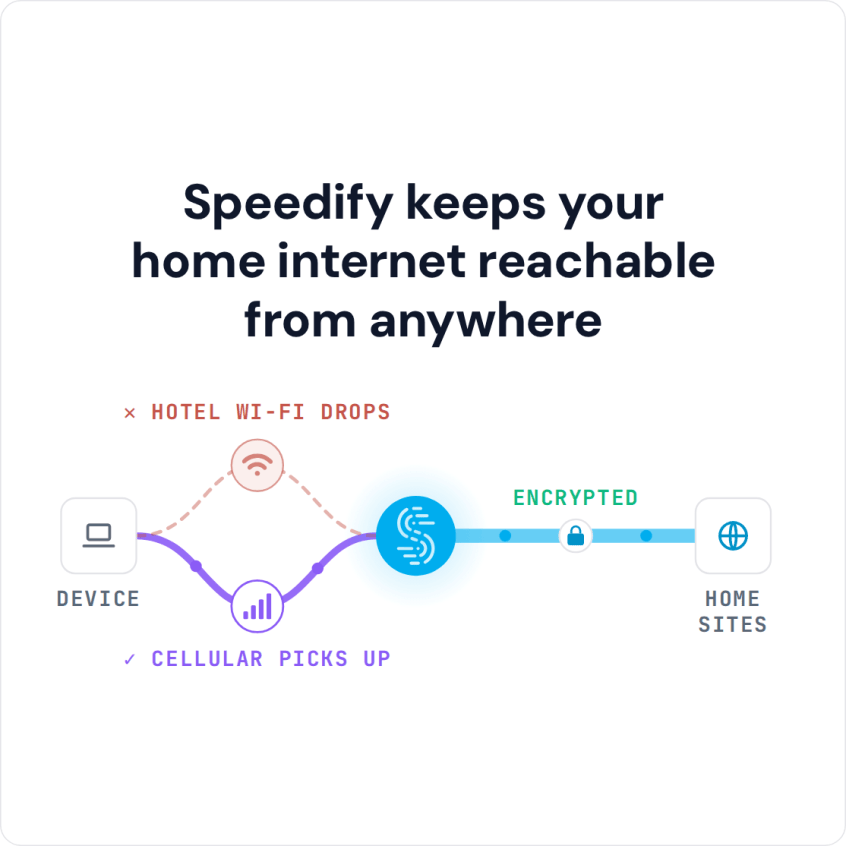
Speedify is a VPN that combines internet connections and uses fast encryption technologies to secure your online traffic. Because Speedify can use multiple connections at the same time, it adds their speed together and makes the connection more reliable: if one connection drops, Speedify moves the traffic to the other one and your call or download keeps going.
5 Steps to Choose the Best VPN for Traveling Abroad
Here are the steps you should take to get yourself the best VPN for traveling abroad:
- Check what the VPN service records and whether it sells your data. All VPNs protect your online activities to a degree (especially important when using unprotected public Wi-Fi hotspots), but the privacy policy tells you what is kept. Speedify, for example, keeps no record of the sites you visit and does not sell personal data; it does record connection metadata such as IP address, device ID, connection time and data used.
- Be careful with free VPN services: you’ll basically get what you’re paying for, and many pay for themselves with ads, so different companies may end up “chasing” you online with advertisements. A free tier from a paid service is a different thing: Speedify gives you 5 GB per month with a free account to try the same app.
- Go for stability: conventional VPN services have a major flaw with how they’re built, running all traffic through a single connection.
Speedify has automatic failover protection instead. Speedify can use multiple internet connections at the same time (hotel Wi-Fi and your phone’s 4G/5G cellular, for example), detects when one is about to drop and moves traffic to the connection that still works. Your public IP address stays the same through the switch, so calls and logged-in sessions carry on. - Seek the speed: any conventional VPN service adds overhead to encrypt your traffic, so your Internet will be slower when using traditional VPNs.
Speedify encrypts with AES-256-GCM or ChaCha20-Poly1305, and when it combines two or more connections, your bandwidth hungry VoIP video calls and online video streams draw on the combined speed of both (Speedify says up to 95% of the combined upload and download speed). - Get full coverage for all your devices: whether you work from a Mac or PC laptop or from an iPhone, iPad or Android smartphone, the VPN for road warriors you choose should support all of them without charging extra for each one. Speedify runs on Windows, macOS, iOS, Android and Linux, and one Individual plan covers up to 5 devices at once.
How Speedify Keeps You Online, Fast and Secure While Traveling Abroad
Using a VPN will protect you, but most VPNs also slow down the Internet, as all data passes through their servers first before going to or from its final destination.
Speedify makes up for that slowdown by adding a second internet connection: with hotel Wi-Fi and your phone’s 4G/5G cellular combined, you get more speed than either gives alone.
Abroad, Speedify also keeps your connection to your own home services, such as your bank, encrypted, and can get you past many hotel and public Wi-Fi networks that block sites. Streaming services set their own regional rules in their terms: Speedify does not unblock geo-restricted streaming libraries, so you see the library of the country you are in. It is not designed to unblock other location-restricted sites either, but a server in another country may give access to some of them. If your bank or another service blocks VPN connections, Speedify’s Bypass setting (Settings > Bypass, or App Bypass on Android) sends that service outside the encrypted tunnel.
How to Use Speedify on Hotel Wi-Fi and 4G/5G Cellular
Install Speedify on your phone and laptop before you leave, then create a free account (5 GB per month) or sign in. On the phone, keep Wi-Fi and cellular data both turned on, tap Allow when the phone asks to add a VPN configuration, and Speedify uses the hotel Wi-Fi and your 4G/5G cellular together. On a laptop, add the phone as a second internet connection with a USB cable: iPhone USB tethering works on Mac and Windows, and an Android phone works over USB on Windows and often on a Mac.
Get equipped with the best VPN for traveling abroad before your flight. Get started with Speedify now: create a free account and get 5 GB per month to try it on hotel Wi-Fi and 4G/5G cellular.
Speedify
Get started with Speedify today.
Speedify combines Wi-Fi, 4G/5G cellular, Ethernet, Starlink and satellite into one faster, more reliable internet connection. Free to try: 5 GB a month with a free account. No credit card required.
🚀 Speed
Faster uploads and downloads, because Speedify uses all your internet connections at once.
📶 Stability
If one internet connection drops, Speedify moves your traffic to the others in milliseconds.
🔒 Security
AES-256 encryption on every internet connection, on any network you join.



15M+ downloads worldwide. 75K+ five-star reviews on iOS and Android.