
Uninterrupted Field Reporting with Speedify Live Streaming Tool for Broadcast Journalists
Field reporting now runs on a phone and whatever mobile signal the location happens to offer, which is why live hits arrive jittery, lag behind the studio, or die halfway through. One cellular network at a breaking-news scene is shared with every other crew and bystander standing there.
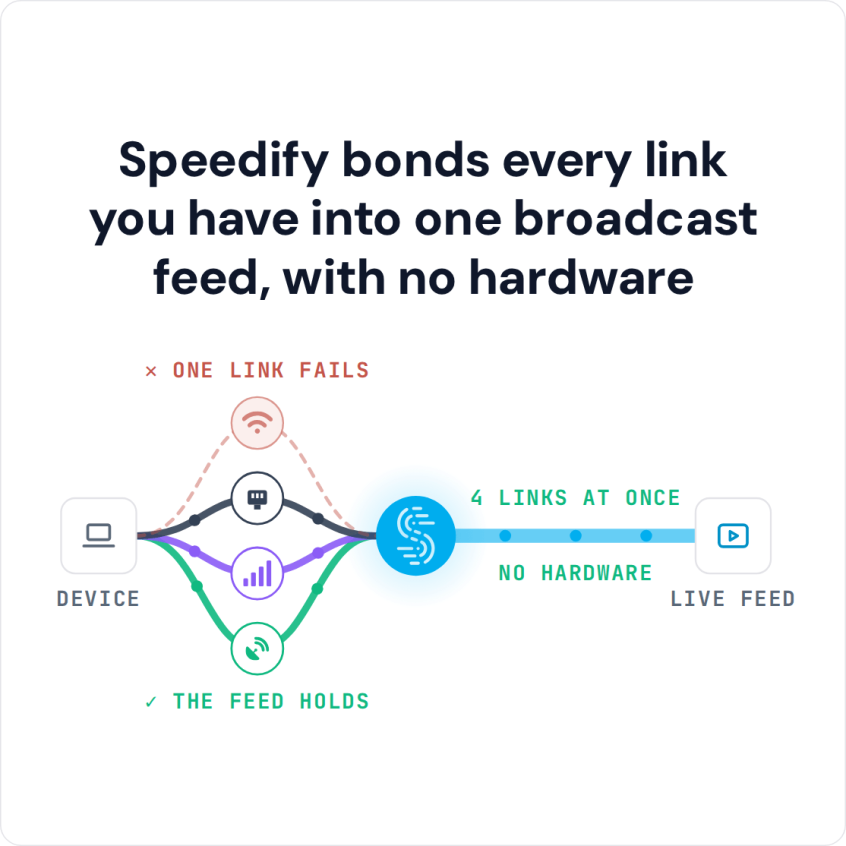
Speedify is software that sends one broadcast over several internet connections at once (4G/5G cellular from more than one carrier, Wi-Fi, wired Ethernet, Starlink), so a reporter’s feed does not rest on a single network. The gain needs two or more internet connections: on a single connection, Speedify works as an encrypted VPN and cannot stop that connection from dropping.
This piece covers the causes behind unstable field internet connections and how correspondents go live using Speedify; newsrooms can talk to Speedify about equipping their reporters.
Watch now
How Speedify combines internet connections on any hardware
Get started with Speedify for your business
Speedify offers three commercial paths. They work together, and most enterprise customers use two or more.
01
Speedify Teams
Speedify on every supported OS for every team member
Centralized dashboard for billing, user provisioning, and usage analytics
CSV import/export and a RESTful management API
02
Speedify for Routers
License for supported OpenWrt routers
Powered by Speedify hardware lineup ready to deploy out of the box
Miri, GL.iNet and other partner models
Covers every device on the network, with no per-device install
03
Embed Speedify into your product
A · DIY
Build it yourself with the Speedify SDK.
Integrate Speedify into your iOS, Android, Windows, macOS, Linux or QNX product. Full developer documentation, sample code and supported integration paths. Your team owns the build, and the Speedify SDK handles combining the internet connections.
B · CUSTOM ENGINEERING
Have the Speedify team build it for you.
Getting Rid of Connection Issues with the Best Live Streaming Tool for Broadcast Journalists
Slow internet and outright disconnects hurt most in the middle of a live field broadcast, for viewers and for the journalist on air.
The most common situations where you might run into these connectivity issues with live streams include:
- Reporting on the move: on the street, on a bus or on a train, where a bad / spotty WiFi hotspot can break the live broadcast.
- In crowded areas: at a stadium, a concert or any big event, the cellular capacity nearby may not be enough for everyone, and upload is the first thing to suffer.
- At home or at work: your ISP may run maintenance right when you go live, or be throttling data to certain platforms.
If the connection is slow, the stream drops to a lower resolution and the video looks jittery / choppy. If the connection drops altogether, viewers are left watching a loading or error screen.
Mobile Live Streaming Setup for News Reporting: What a Reporter Carries
A field kit for live news reporting is small: a phone or laptop running the streaming app or encoder software the newsroom uses, a microphone, a battery pack, and two or more internet connections on different carriers. The second connection can be a second phone’s Personal Hotspot, a USB cellular modem, venue Wi-Fi or a wired Ethernet drop at the scene. Speedify runs on the streaming device and combines those connections, so the feed does not depend on the one tower everyone at the scene is sharing.
How to Go Live from the Field with Speedify
- Download Speedify on the phone or laptop the reporter streams from (Windows, macOS, iOS or Android).
- Open Speedify and create a free account (the free tier includes 5 GB per month), or sign in with the newsroom’s Speedify account.
- Add a second internet connection on a different carrier: on a phone, keep cellular on and join a second phone’s Personal Hotspot over Wi-Fi; on a laptop, add a USB cellular modem, a tethered phone, venue Wi-Fi or Ethernet.
- Connect. Speedify uses all the connections at once and moves the stream to the working ones when one drops.
- Open the streaming app or encoder and go live as usual.
Speedify Live Streaming Tool for Broadcast Journalists Combines Multiple Internet Connections at Once
If the Internet connection speed and latency causes issues with your live video streams as a journalist in the field, then you should get more bandwidth, preferably from more sources.
Speedify gets you faster, more reliable and secure internet by allowing you to use multiple Internet connections at the same time. For live broadcast journalism, that means more upload capacity for the feed, plus an automatic failover mechanism in case anything happens to one of your connections.
Speedify combines two or more internet connections by splitting traffic per packet across all of them. Because Speedify is software, it runs on the devices a crew already carries: Windows and macOS laptops, iPhones, Android phones and tablets, and Linux machines.
If one of your connections fails, Speedify automatically reroutes all the traffic through your other available connections and keeps the same public IP, so the stream to the studio is not cut off and restarted. This happens in the background without you having to do anything. When the dropped connection is back online, Speedify picks it up and starts using it again.
Speedify Is Used on Millions of Devices Worldwide
Speedify has made internet connections faster and more reliable for businesses and individuals since 2014.
15M+
Speedify downloads worldwide75K+
5-star reviews for Speedify on iOS and Android82
Speedify server points of presence in 50+ cities on 6 continents500TB+
Of internet traffic carried by Speedify every weekSpeedify Partners
Speedify works with these companies to bring faster, more reliable internet and networking technology to their customers and employees.


Speedify Encrypts a Reporter’s Feed on Public Wi-Fi
Speedify also works as a mobile VPN, with advanced encryption that protects reporters on compromised WiFi networks: the footage you stream and the files you send to colleagues at the studio travel encrypted to the Speedify server.
Before Speedify, users often had to choose between security and speed. Speedify was designed with speed as one of its primary goals, so with two or more connections combined you do not have to give up speed for security.
Get started with Speedify today on a single laptop or phone. Newsrooms equipping a whole team of reporters can contact Speedify about plans for the team.
Speedify Business Solutions
Speedify Teams
Speedify for Routers

Speedify Embedded Solutions and Integrations
Add Speedify to your own app or hardware with the Speedify SDK. Your product then combines internet connections, fails over automatically when one drops, and encrypts the traffic, using the same technology as the Speedify app.