
Solved: Airport WiFi Connected, but No Internet Connection
Airport Wi-Fi stops working, or shows connected but no internet, for three common reasons: hundreds of travelers share it at the same moment, your free session has expired or the sign-in page never loaded, or your phone joined a shop or restaurant hotspot nearby. Speedify is an app that uses the airport Wi-Fi and your phone’s 4G/5G cellular at the same time, so you are not depending on the terminal’s overloaded network alone. With the airport Wi-Fi alone, Speedify works as an encrypted VPN and cannot fix that network. The three steps ahead get you online at the gate, and they also cover privacy on a public network.
Airport Wi-Fi Connected but No Internet: The Usual Causes
The most frequent reason you get no internet on airport Wi-Fi is outdated equipment or too many people connected at once. As internet use grows, older Wi-Fi hardware hits its limits and has to be upgraded to keep up. The same thing happens during an airport’s daily rush hours, when every gate is full.
Less common reasons for no internet on airport Wi-Fi include:
- Time-limited sessions: when your free session expires, you lose the internet until you watch an ad or sign in again.
- Weak signal: some hotspots are placed where the signal is spotty.
- Your device joining other public Wi-Fi hotspots in the airport, from restaurants to duty-free shops. These might not work, or might need you to accept terms or watch an ad on a sign-in page before they connect you to the internet.
To get back online, open a browser and load any plain http:// address (not https) to bring up the sign-in page again, check that you joined the airport’s own network and not a shop’s, and move away from the busiest gate area if you can.
How to Fix Airport Wi-Fi Not Working with Speedify in Three Steps
Speedify is an app built for combining Wi-Fi and 4G/5G cellular: it securely combines two or more internet connections at the same time for more speed and reliability. In an airport, that means using the airport Wi-Fi and 4G/5G cellular together on your laptop, phone or cellular tablet.
Here are the three steps to fix airport Wi-Fi with no internet:
- Get Speedify on your laptop or phone. Speedify is available for Windows, macOS, Android and iOS.
- Turn on both Wi-Fi and 4G/5G cellular. You can set data caps in the Speedify app, so you do not go over your plan and pay extra. On a laptop, you can combine the airport Wi-Fi and cellular from your phone connected by USB, or link together the airport Wi-Fi and another public Wi-Fi network (from a restaurant or a duty-free shop) with a second Wi-Fi adapter. On a Mac, USB Wi-Fi adapters work only on Intel Macs with macOS 11 or older.
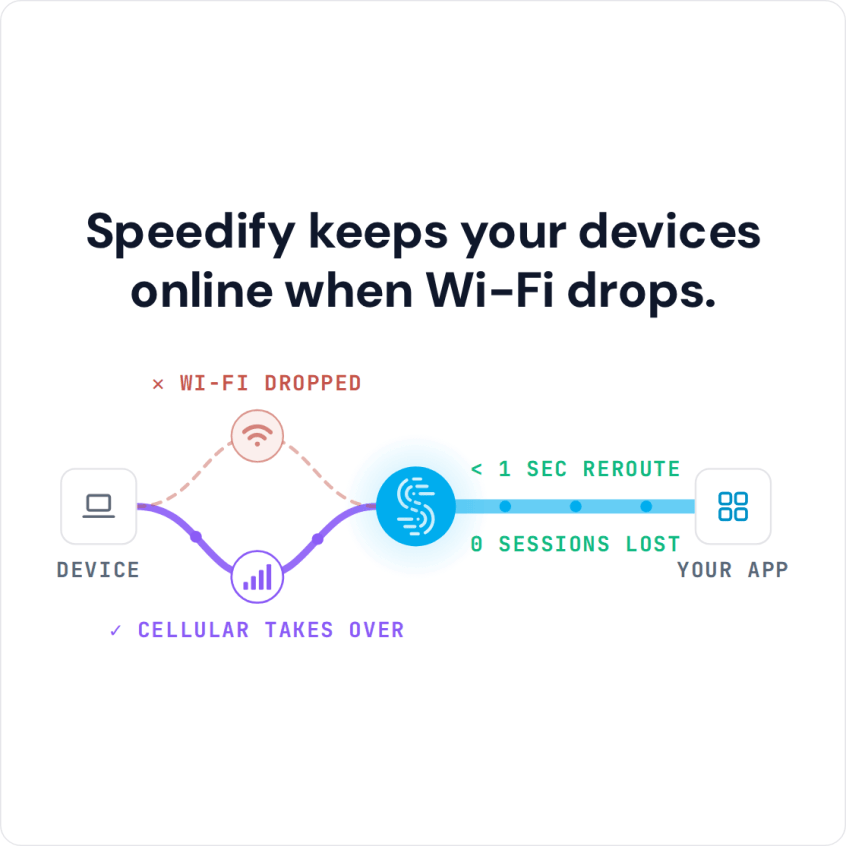
- Connect and use the internet as usual. Speedify combines every connection it detects, and when the airport Wi-Fi stops passing data, Speedify moves your traffic to the other connection.
What Else Speedify Does on Airport Wi-Fi
Because Speedify uses multiple internet connections at the same time, if your device connects to an airport Wi-Fi hotspot with no internet, Speedify keeps you online over the other connection and keeps the same public IP address, so logged-in sessions and calls carry on. With two connections, Spotify keeps playing, a work call is less likely to jitter and a video stream stays online when the airport Wi-Fi fails.
Speedify also encrypts your traffic like a VPN, which matters on airport Wi-Fi shared by thousands of strangers. Speedify protects you against fake hotspots, snooping hackers and other cyber threats, and works with the airport’s captive portal (login page), detecting the page so you can sign in without disconnecting.
Other VPNs can be clunky and slow because they push all your traffic through one internet connection. With Wi-Fi and 4G/5G cellular connected, Speedify uses both at once; on a single connection, Speedify works as an encrypted VPN and can be a little slower.
Get started with Speedify today: the free tier includes 5 GB per month with a free account, so you can try it on your next trip.
Speedify
Get started with Speedify today.
Speedify combines Wi-Fi, 4G/5G cellular, Ethernet, Starlink and satellite into one faster, more reliable internet connection. Free to try: 5 GB a month with a free account. No credit card required.
🚀 Speed
Faster uploads and downloads, because Speedify uses all your internet connections at once.
📶 Stability
If one internet connection drops, Speedify moves your traffic to the others in milliseconds.
🔒 Security
AES-256 encryption on every internet connection, on any network you join.



15M+ downloads worldwide. 75K+ five-star reviews on iOS and Android.